March 1, 2026
For an indie app developer, releasing an app feels like sending your child out into the world. But when the gatekeeper — the app review process — becomes an insurmountable, irrational wall, the result can be devastating. This is the complete record of how my app was suspended despite working perfectly, in hopes that it helps other developers facing the same nightmare: “It works on my device, but Google’s review keeps failing.”
1. A Fresh Start: Determined to Succeed
Late last year, I attempted to release an app called “Concert Manager” on Google Play. It was repeatedly rejected because the reviewer couldn’t log in, and was eventually suspended.
This time, I rebuilt everything from scratch — new UI, new icon, improved usability. To be safe, I submitted to the Apple App Store first. The result? Approved on the first attempt. With the exact same server, code, and credentials, I was ready for my Google Play comeback.
2. The Recurring Nightmare of “SocketException”
After submitting to Google Play, the rejection notice arrived. The reviewer’s screenshot showed a familiar red error screen:
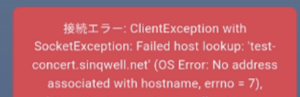
Connection Error: ClientException with SocketException:
Failed host lookup: ‘test-concert.sinqwell.net’
(OS Error: No address associated with hostname, errno = 7)
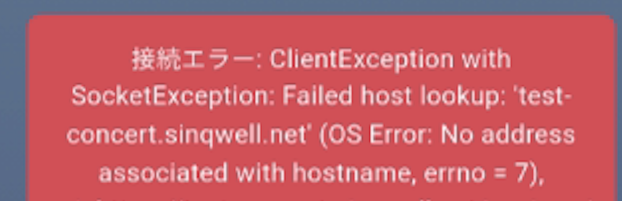
This is not an authentication error. It means the reviewer’s device couldn’t even resolve the domain name — the server was never reached.
Yet on my own Android device, I could log in without any issues. I could create, edit, and delete events. And Apple had already approved the app with the same setup.
3. Every Possible Fix an Engineer Could Think Of
If the reviewer says “can’t connect,” then I’ll make it connect. I questioned everything — from infrastructure to code — and implemented the following:
Server configuration: Disabled all overseas IP access restrictions on Xserver (a Japanese hosting provider), including REST API restrictions and WAF settings.
Flutter code improvements: Suspecting DNS cache issues, I added explicit IPv4 DNS pre-resolution using InternetAddress.lookup before each connection attempt. I also implemented an automatic retry mechanism with up to 3 attempts and increasing delay intervals.
Infrastructure upgrade: Considering the possibility that Google’s review environment uses an IPv6-priority network, I integrated Cloudflare to provide full IPv6 support. I verified that AAAA records (IPv6) resolve correctly from DNS servers worldwide.
Evidence submission: I recorded a video of the app working normally on my Pixel 8a, uploaded it to YouTube, and sent the link to the review team.
4. The Definitive Test: “Deliberately Entering Wrong Credentials”
After the 4th rejection, I ran a critical experiment. I deliberately entered the wrong password on the login screen.
On my device: The app displayed “Invalid username or password” — proving the server was reached and the authentication was processed.
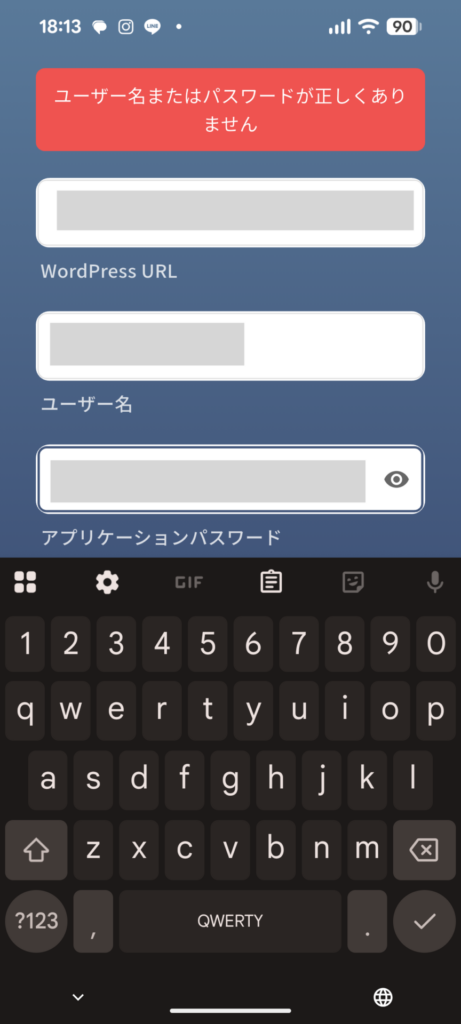
On the reviewer’s device: The same “Failed host lookup” connection error — proving the server was never reached at all.
This objectively demonstrated that the problem was neither the app’s code nor the login credentials. Google’s review environment simply could not reach my domain.
5. App Suspended — While Still in Dialogue with Support
I organized these facts logically and sent a detailed email to Google Play support, explaining that Apple had approved the app, that DNS resolved correctly worldwide, and requesting an investigation of the review environment’s network.
A support representative named Rick responded and asked me to wait before resubmitting. I complied and continued our technical dialogue.
But before Rick could respond to my latest evidence, the suspension notice arrived. Having the door slammed shut in the middle of a cooperative conversation was a feeling of helplessness I cannot fully describe.
6. Conclusion
I am currently appealing this suspension with all available evidence — DNS verification results, Cloudflare IPv6 configuration, the demo video, Apple’s approval, and the error message comparison proving it’s a connection issue, not a credential issue.
Even when a developer exhausts every technical solution, there are invisible walls on the platform side that cannot be overcome alone. But I believe that documenting this experience gives it meaning — both for myself and for other developers who may face the same situation.
If you’re an indie developer struggling with Google Play reviews, know that you’re not alone. Keep records of everything, communicate clearly, and never give up.
This blog is part of “Resilient App Developer’s Journal” (めげないアプリ開発日誌) — documenting the real struggles and small victories of indie app development.