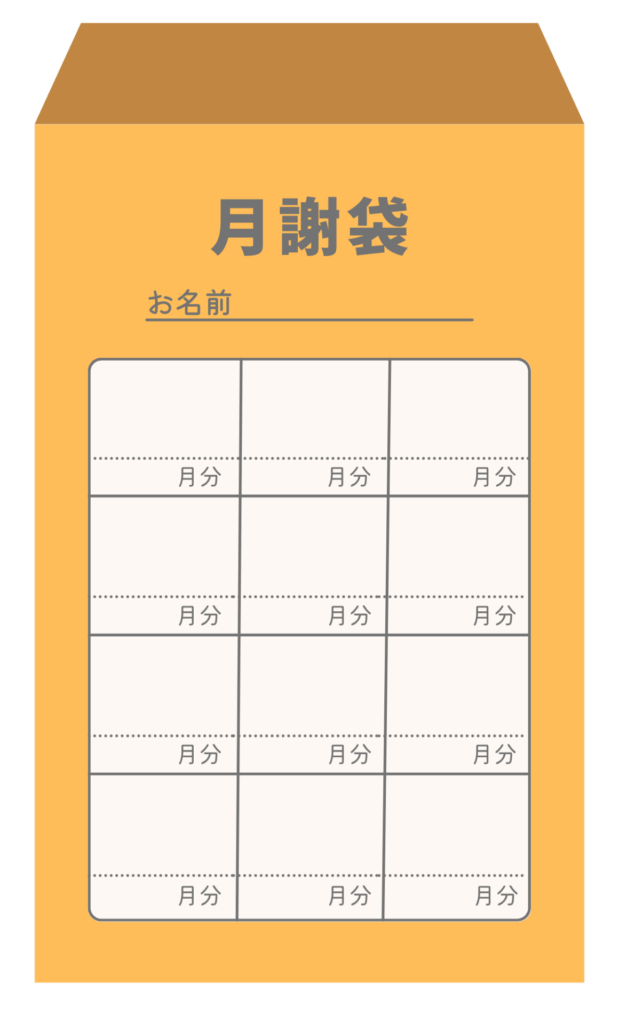
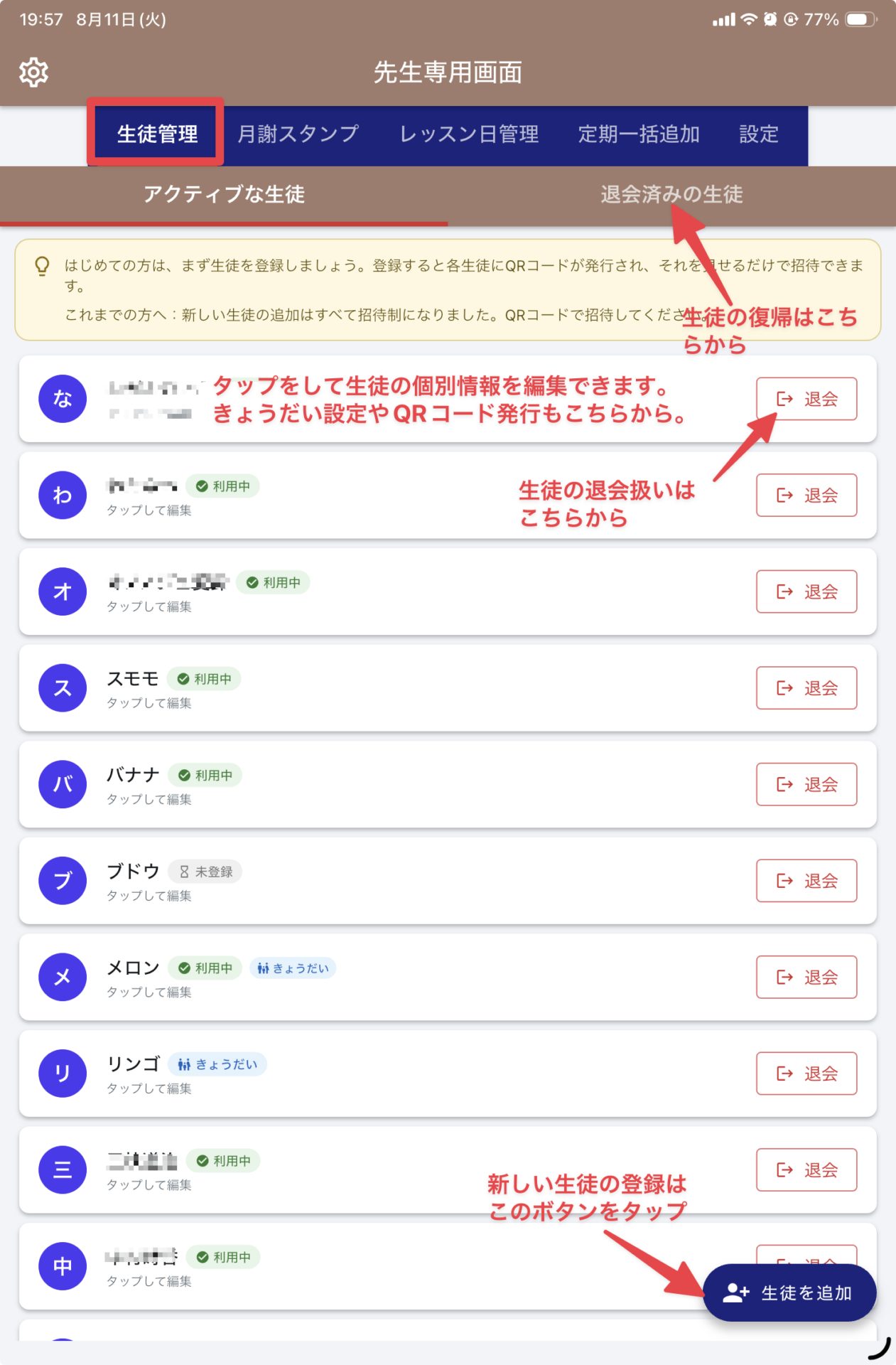
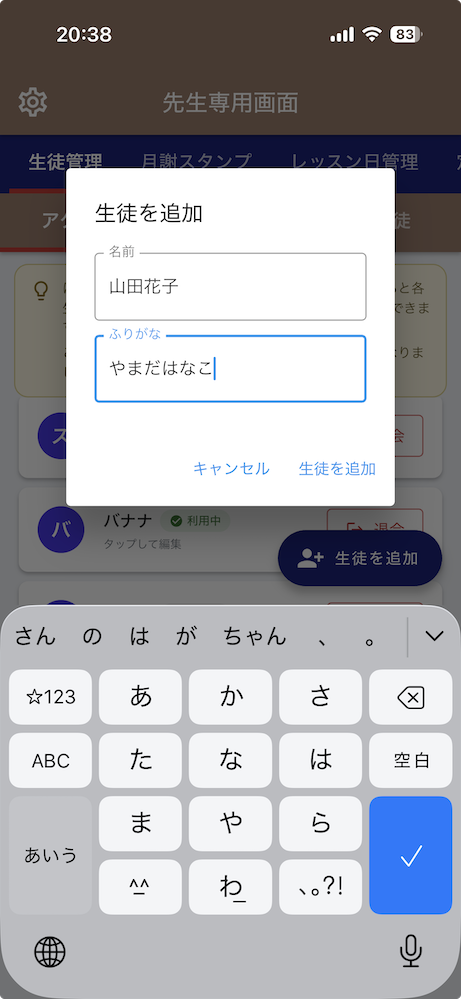
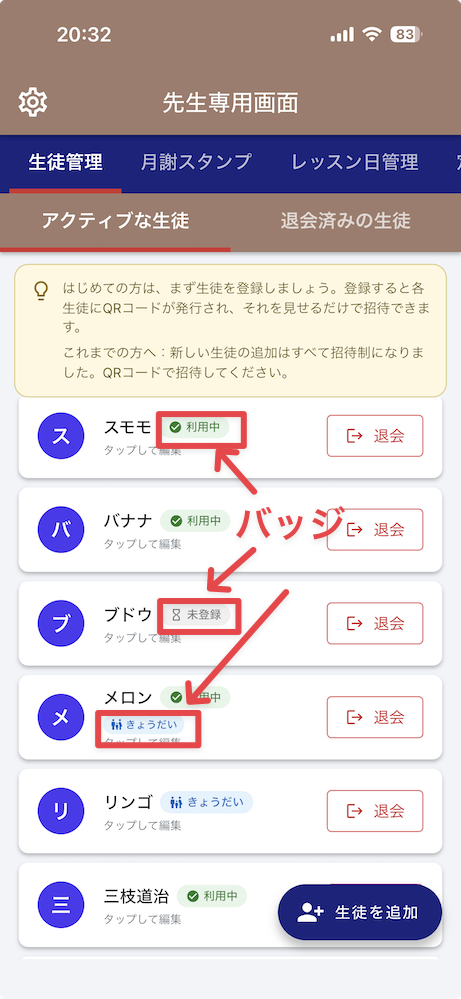
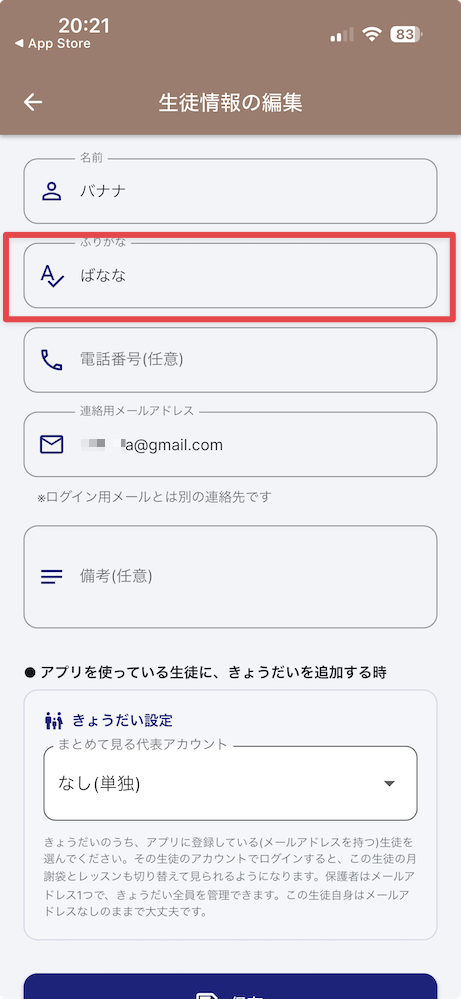
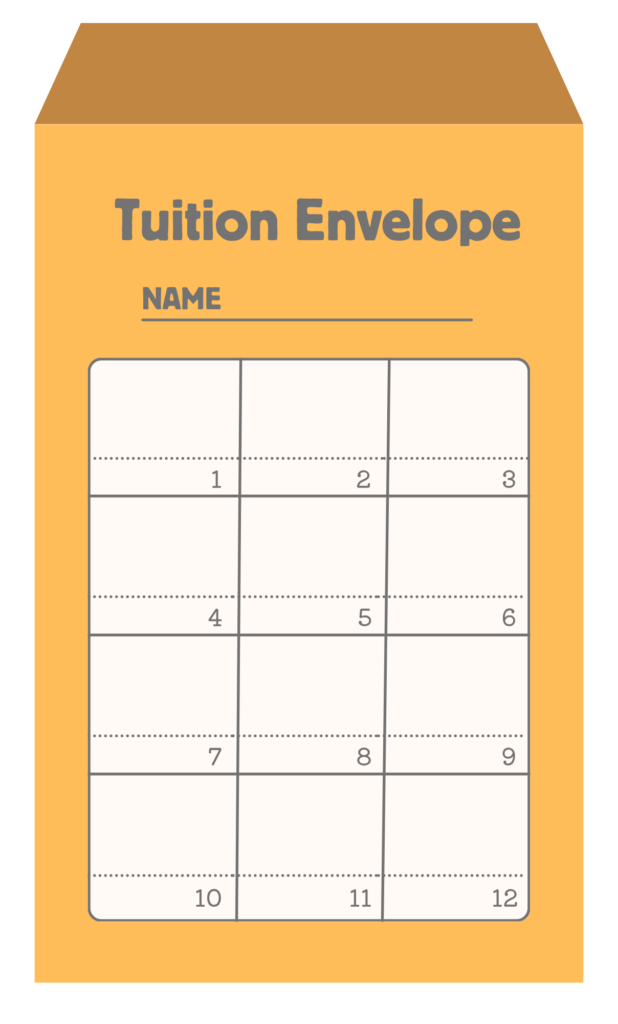
“Monthly Fee Stamp” streamlines classroom management! While retaining the benefits of paper envelopes, this is a tuition and lesson schedule management app designed for independent instructors. It can be used in all types of classes, including guitar, piano, yoga, and dance.
Development Environment: FlutterFlow → Flutter Free (ad-free) (Premium features available for instructors only)
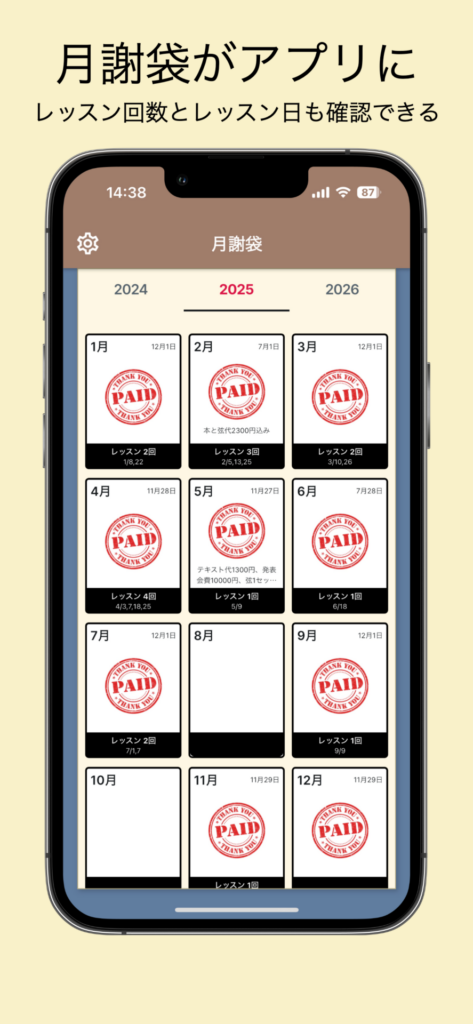
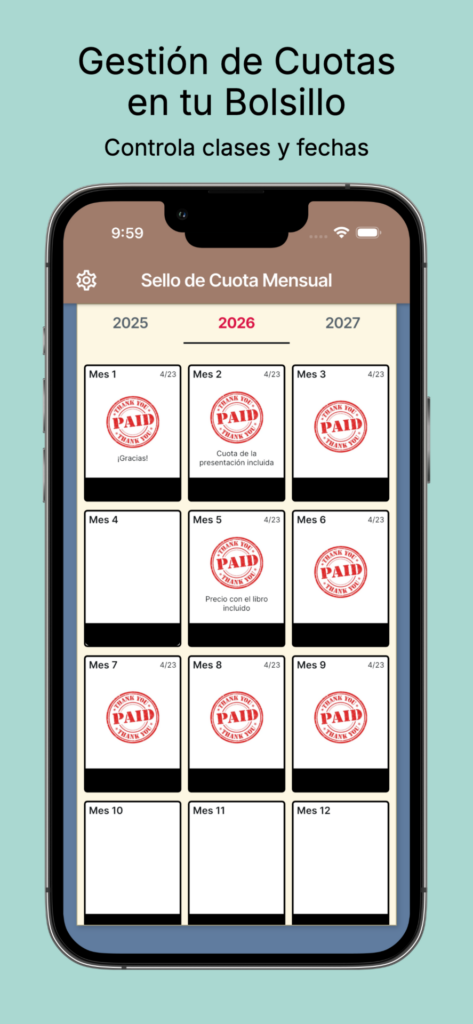
Teachers can check tuition payments via stamped messages, while students can view their payment status directly through the app! It’s also a convenient app that lets you share lesson dates.
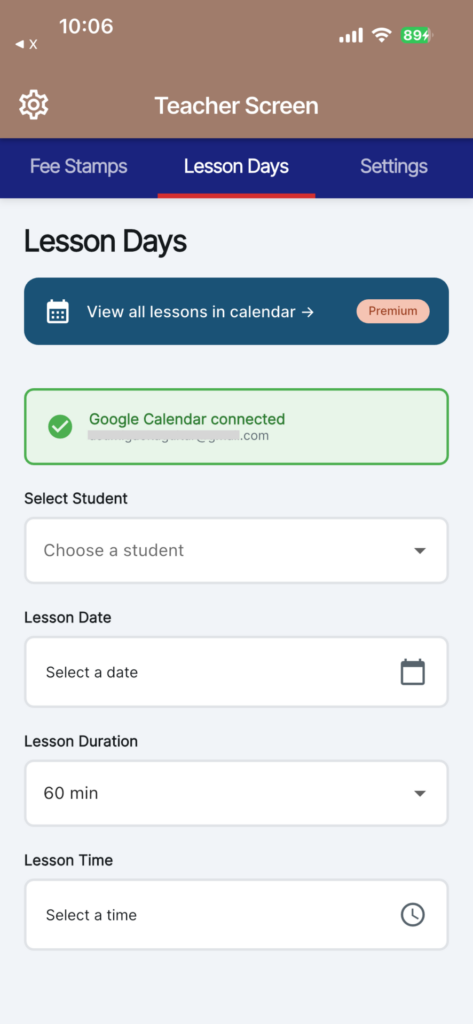
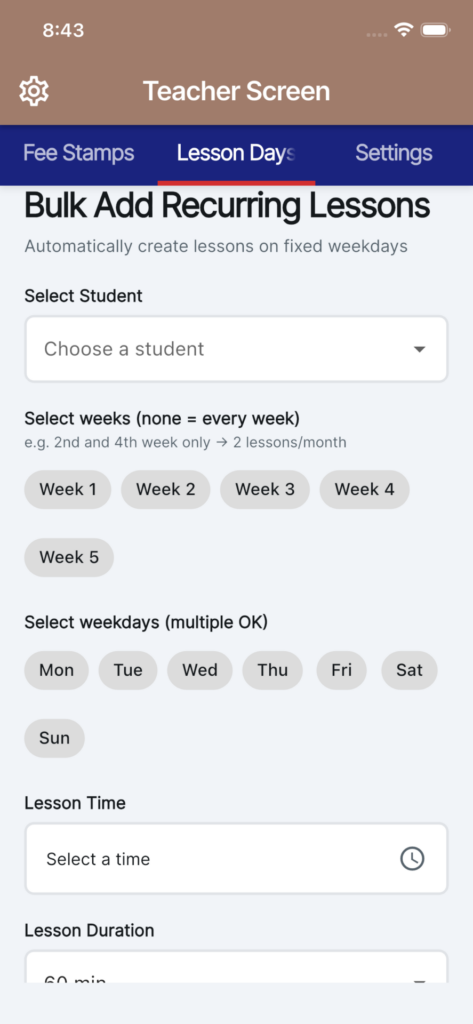
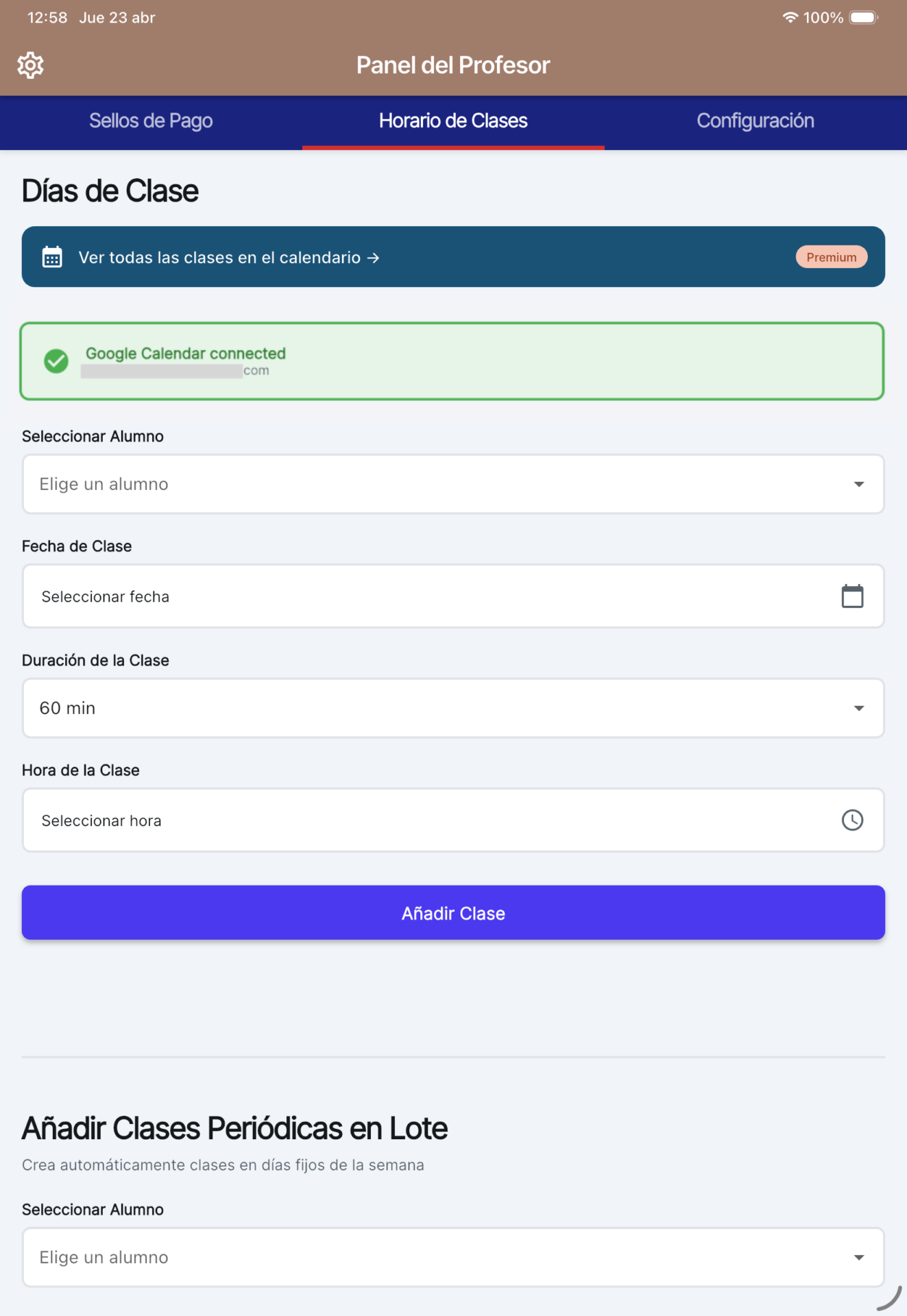
🎉 Fully integrated with Google Calendar! Automatically schedule lessons and register recurring lessons in bulk. You can also specify schedules such as twice-weekly lessons for the second and fourth weeks of the month. Choose from lesson durations of 30, 45, 60, or 90 minutes. Managing your studio has just gotten even easier!
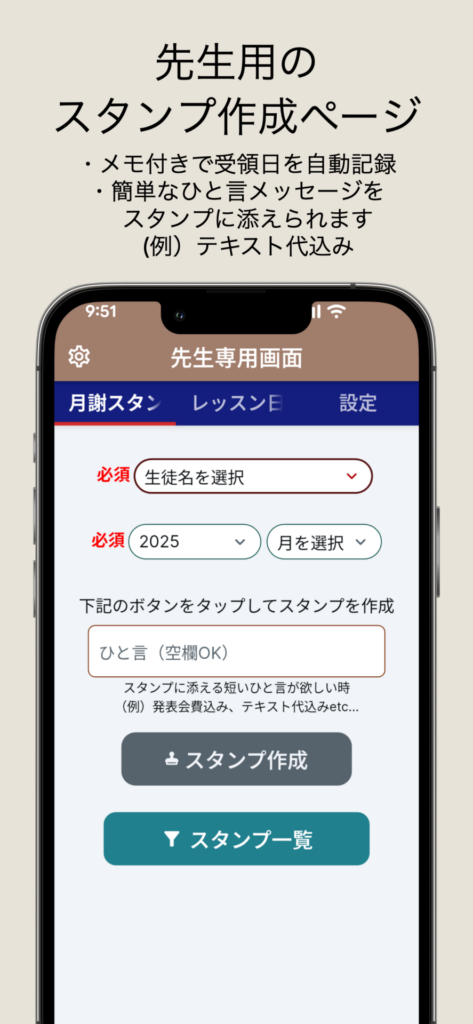
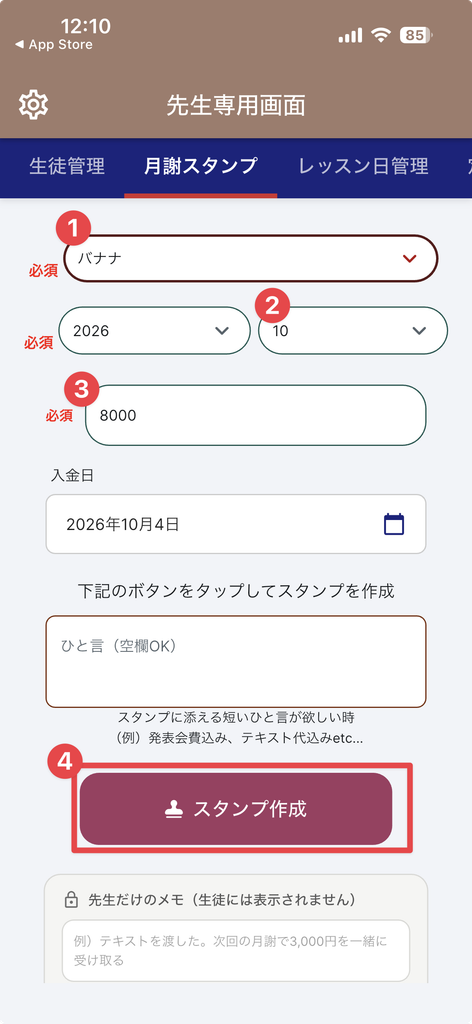
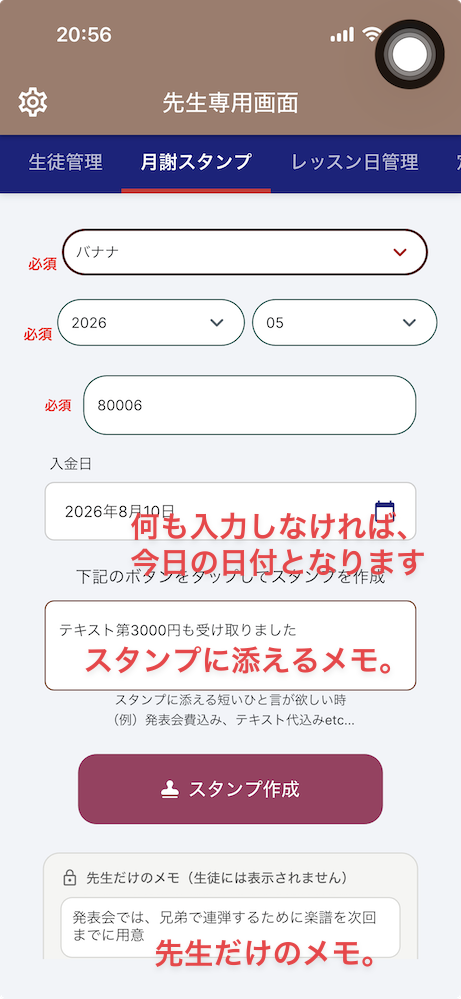
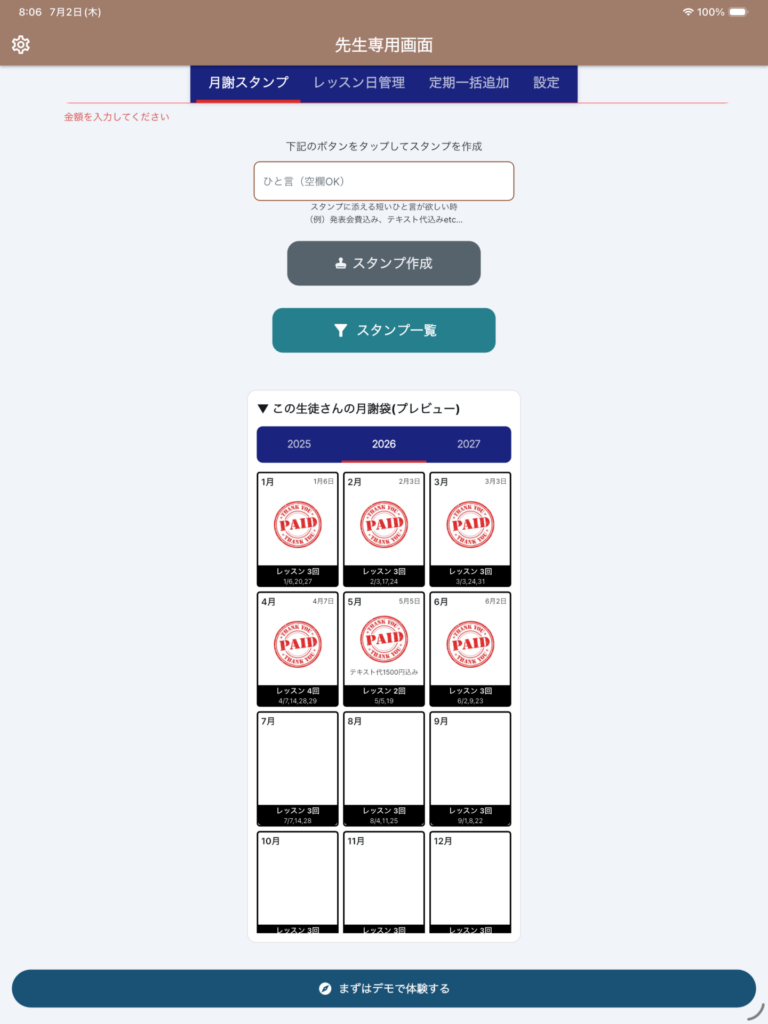
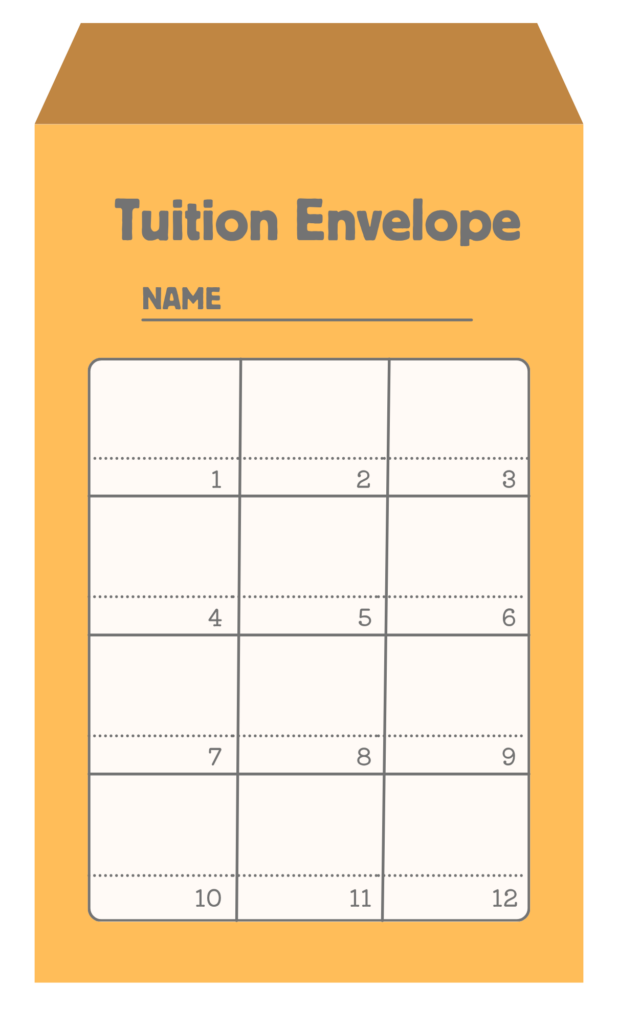
“Monthly Fee Stamp” is a simple attendance and payment collection app that replicates the functionality of a traditional paper fee envelope on your smartphone. All teachers need to do is tap the “stamp” button when they receive a payment. You can add notes to the stamp, such as “includes recital fee” or “includes textbook cost,” and the receipt date is automatically recorded. If you accidentally tap the wrong button, you can cancel it with a single tap. Students (and parents) can check their payment status anytime within the app, just as they would with a paper tuition envelope. It’s easier to read than paper, and you won’t lose it or have to search for it. Experience the same “familiar tuition envelope” experience, right on your smartphone.
What is a “Monthly Fee Stamp”?
This is a tuition and lesson schedule management app designed for independent instructors. It can be used for any type of class, including guitar, piano, yoga, and dance.
It retains the benefits of traditional paper tuition envelopes while eliminating the worry of losing them and reducing the hassle of manual tallying, offering a user-friendly digital solution for both instructors and students. With Google Calendar integration, you can also automate your lesson schedule management.
■ Why managing monthly tuition payments is easier?
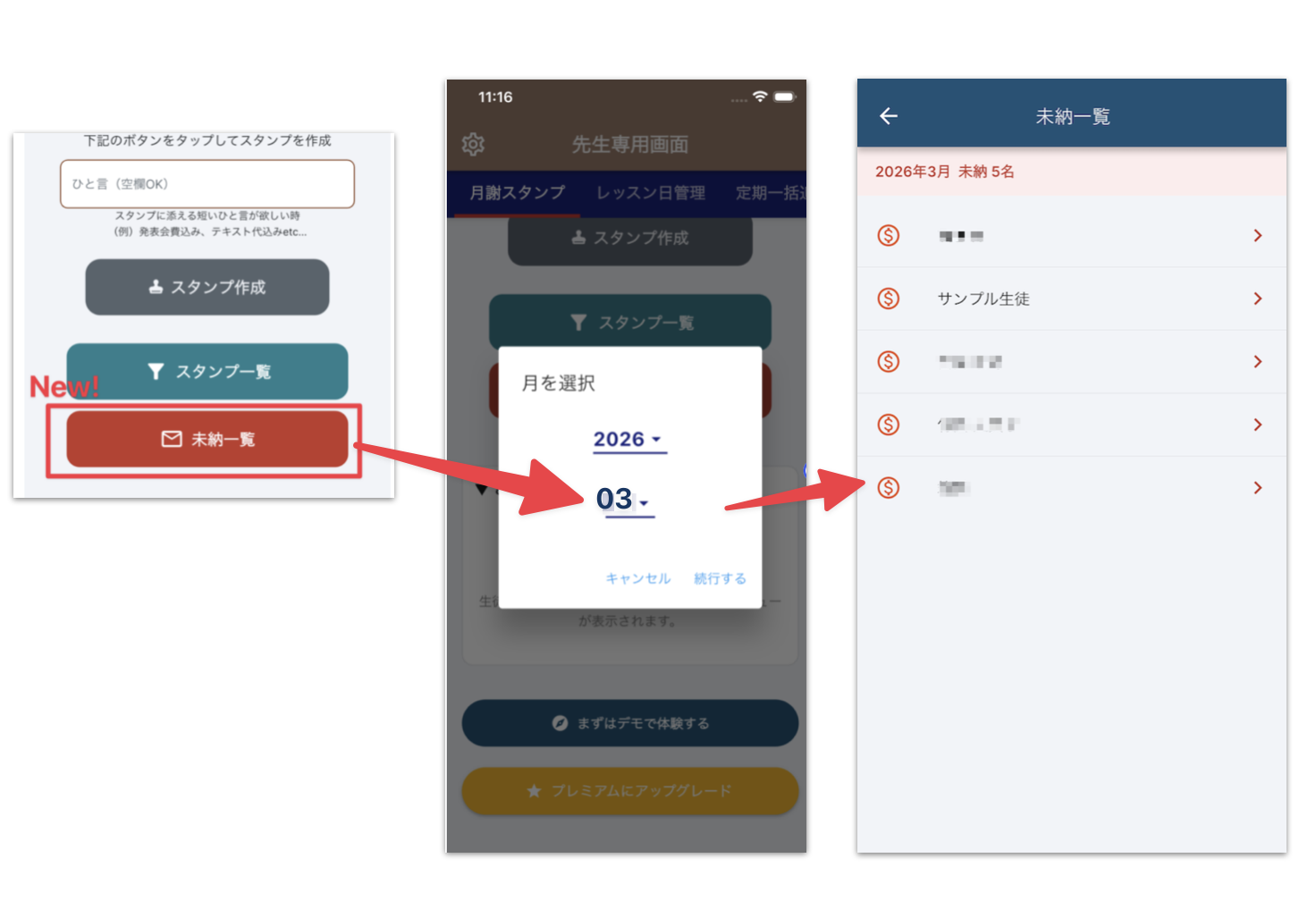
1) No more writing or searching Receipt dates are recorded automatically, and notes can be added with a single tap. No more flipping through papers to find transaction records. 2) Never miss an overdue payment Instantly see who has an outstanding balance by filtering by year, month, or student. This improves the accuracy of your reminders. 3) Perfect for managing multiple classes Data is organized by class ID, so you can manage multiple classes—such as guitar, piano, or abacus classes—with ease. 4) More Convenient and Secure Than Paper Data is stored in the cloud. Even if you switch devices, you can pick up where you left off immediately by logging in with your account.
■ Key Features for Teachers
【Monthly Tuition Stamp Management】
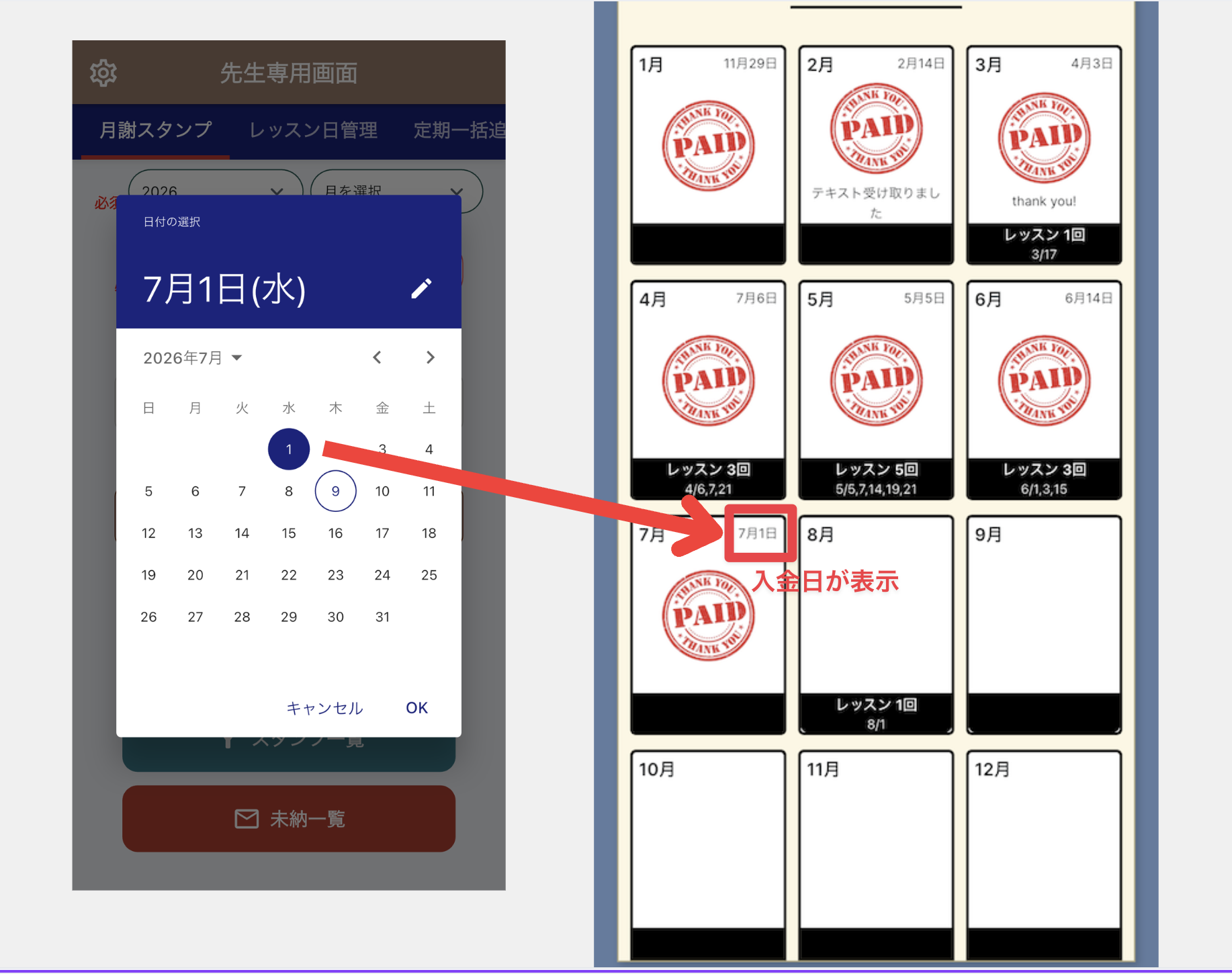
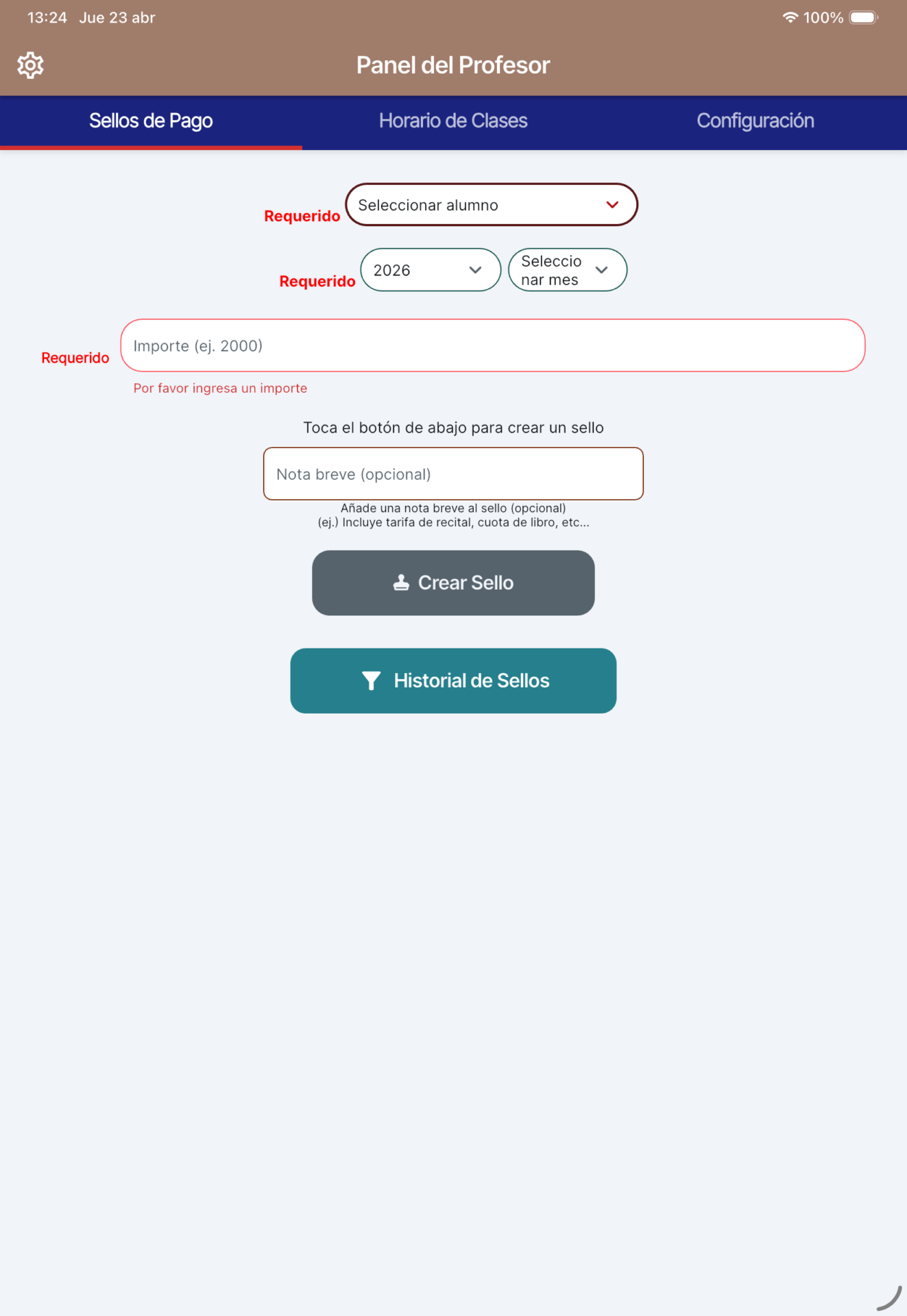
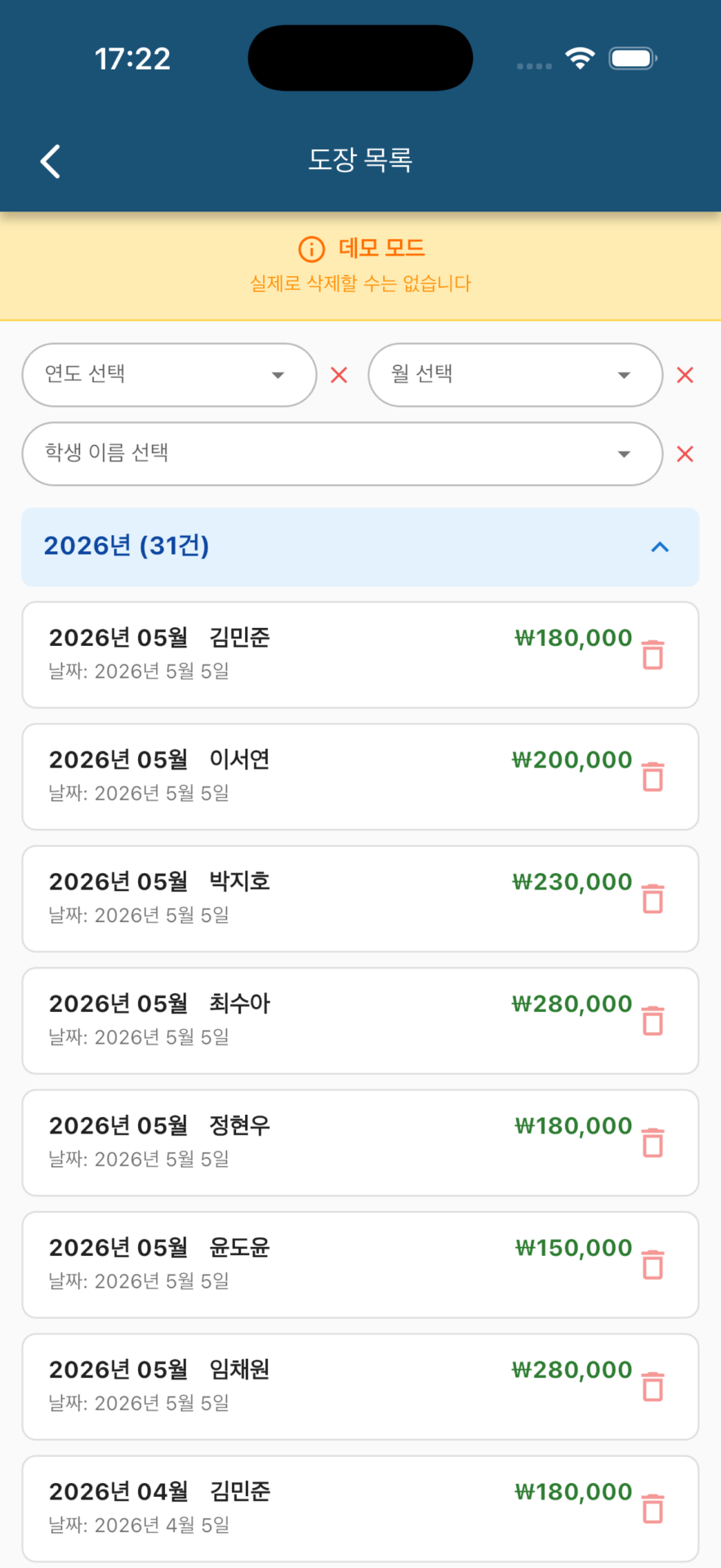
Stamp Registration: When you receive tuition, select a student and stamp the record. The receipt date is automatically entered, and you can also add a note.
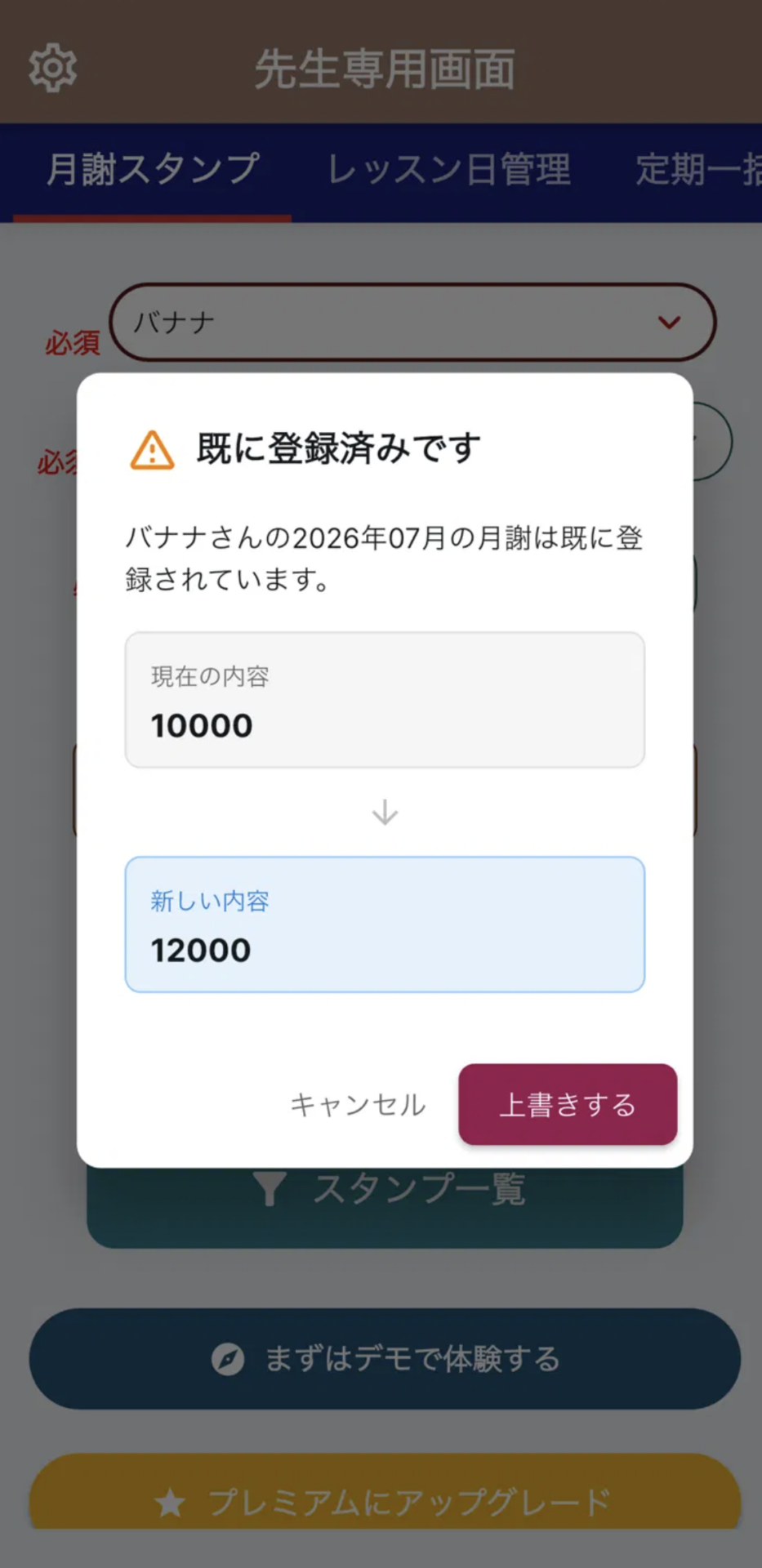
Easy Cancellation: Accidental taps or amount corrections can be instantly reset by canceling the stamp.
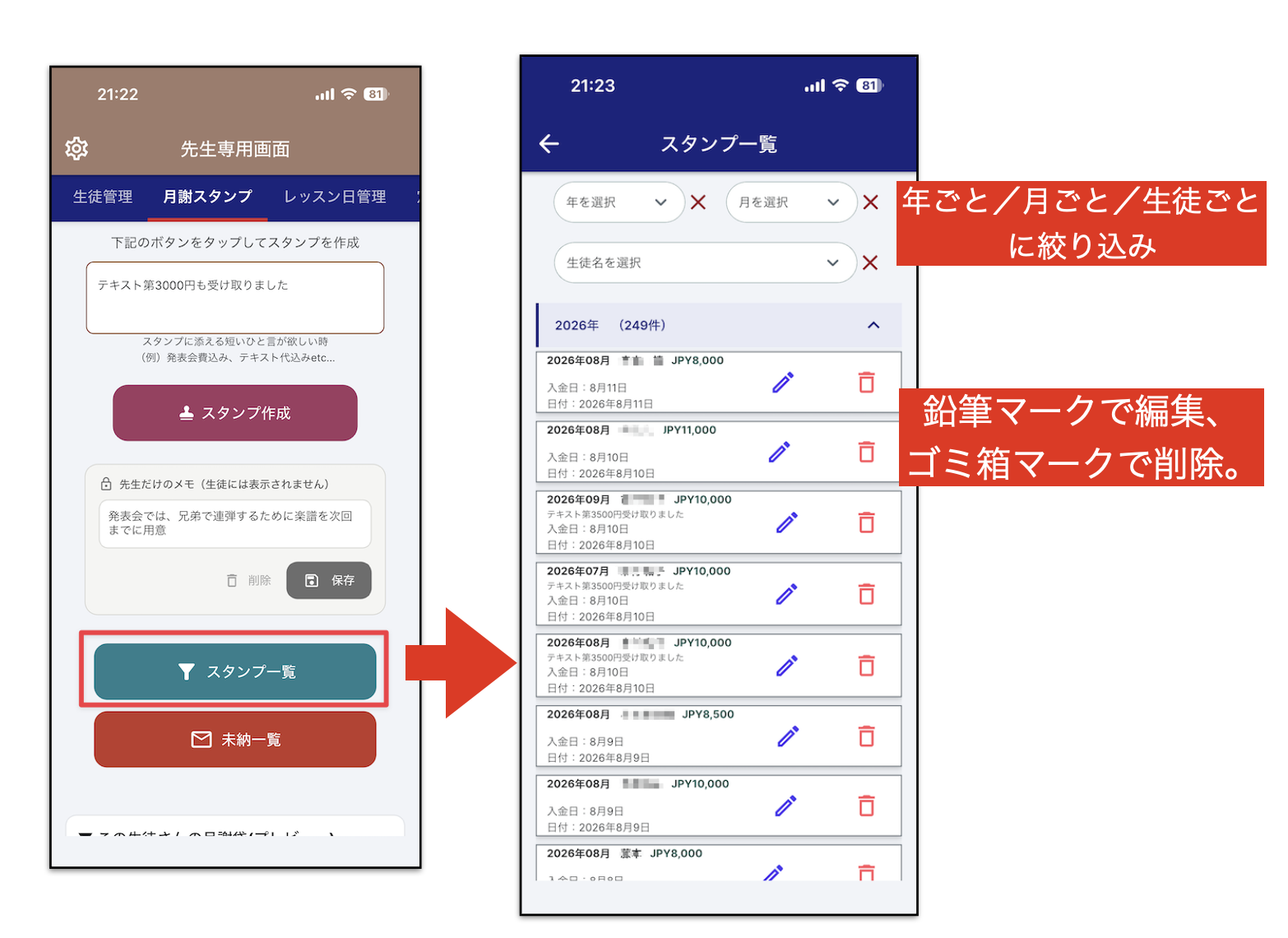
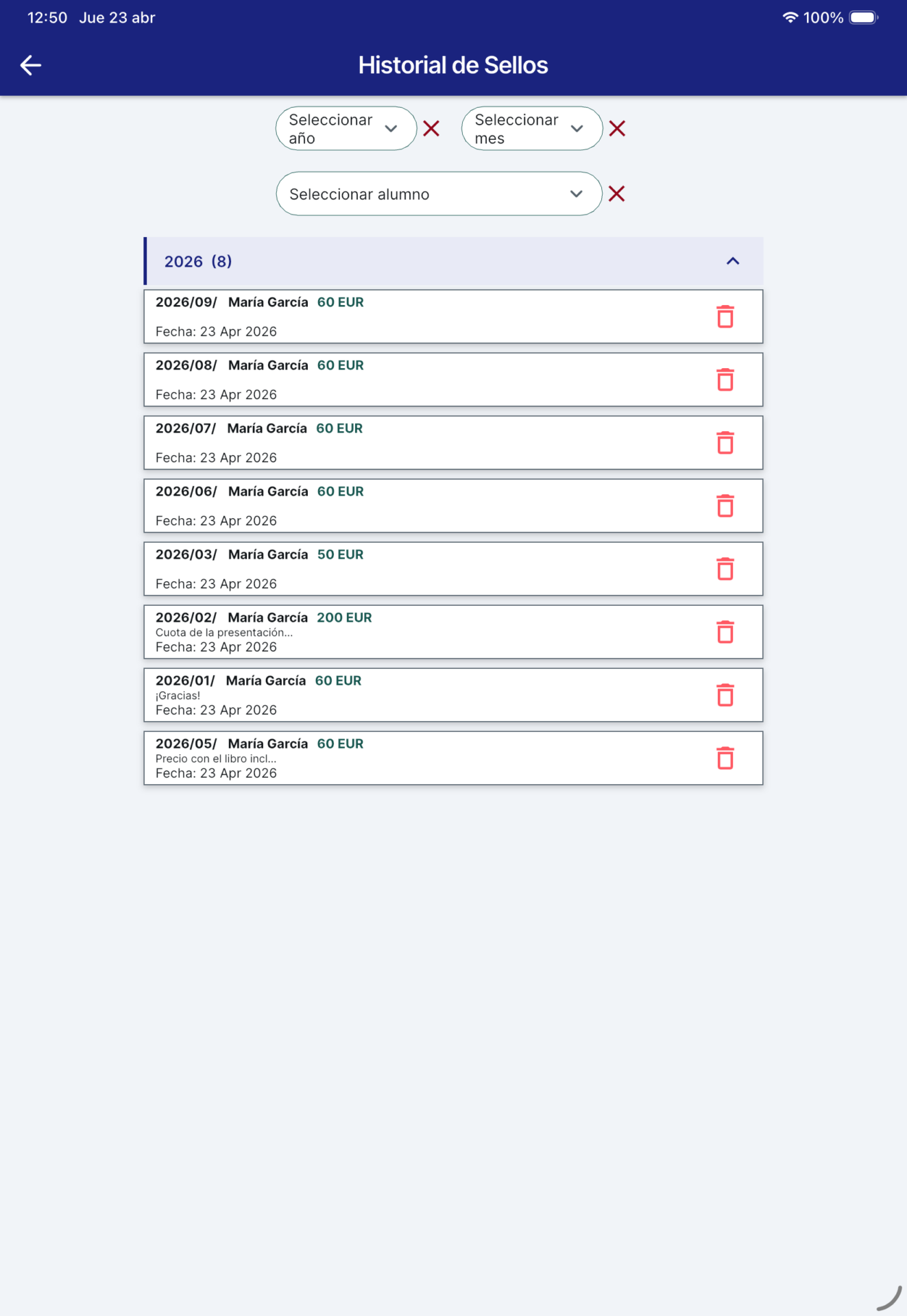
Visual History: Stamp operation history is automatically saved. You can see at a glance who received payment, when, and with which note.
Powerful Filters: Filter by year, month, or student. Quickly identify students with outstanding payments and prevent missed follow-ups.
【Lesson Schedule Management】
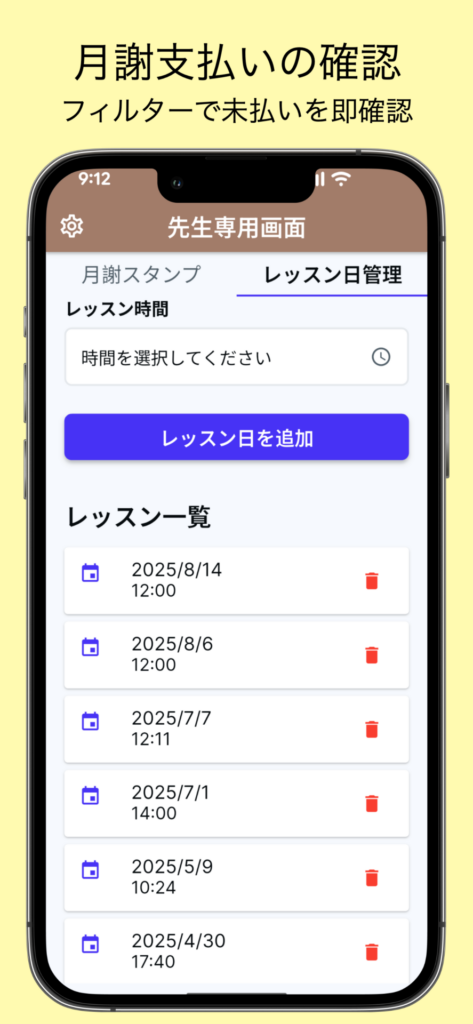
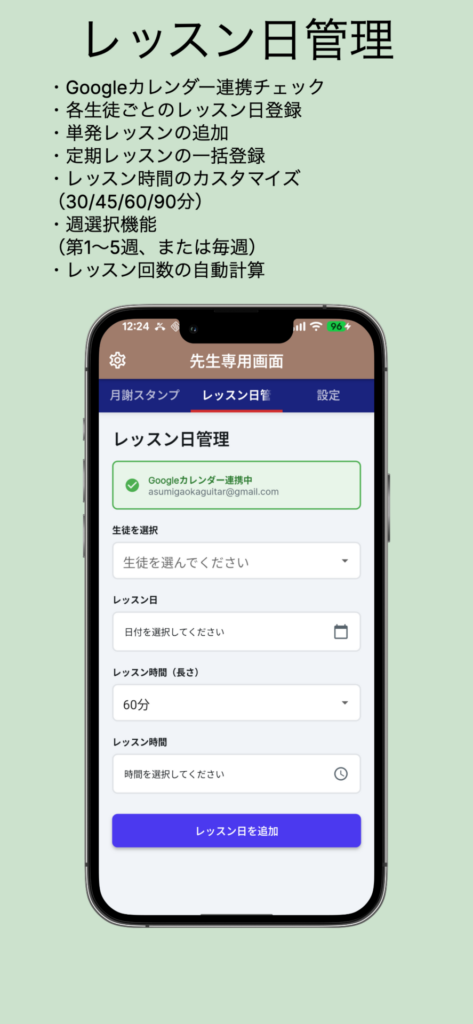
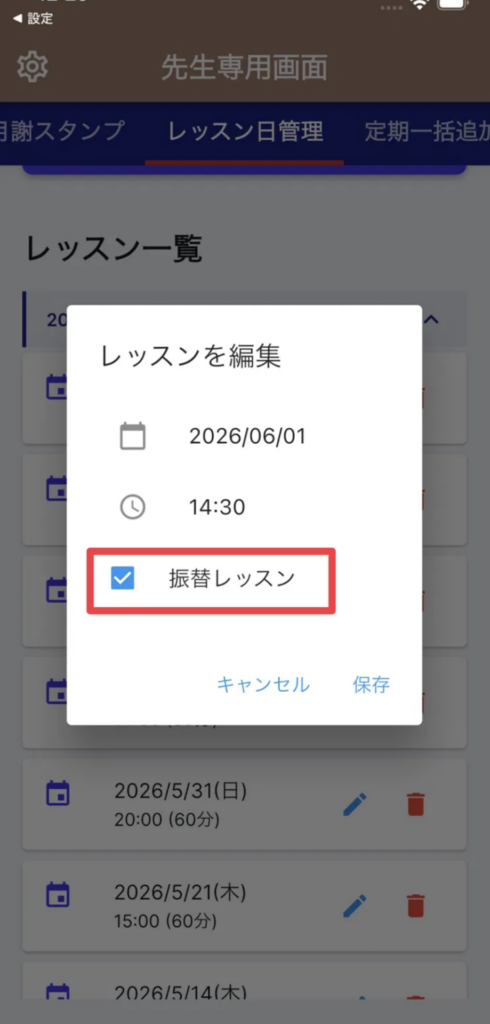
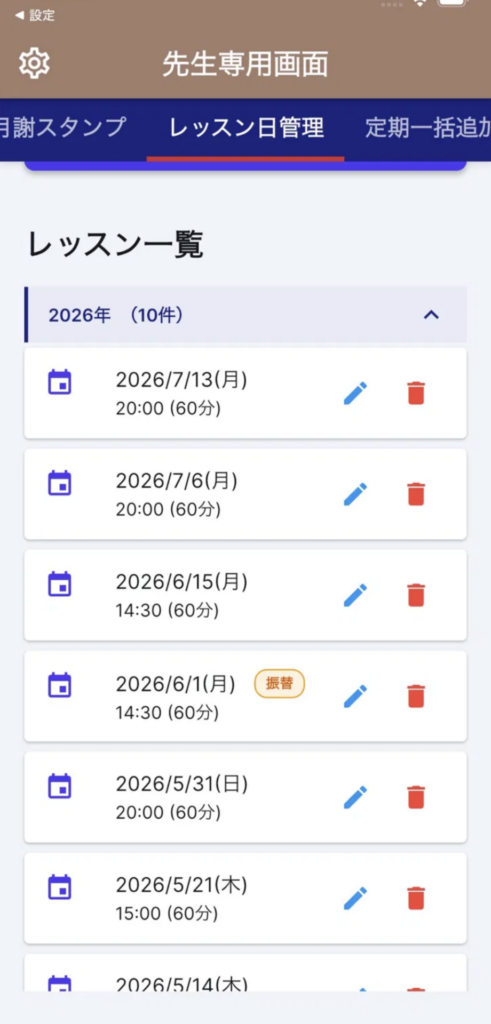
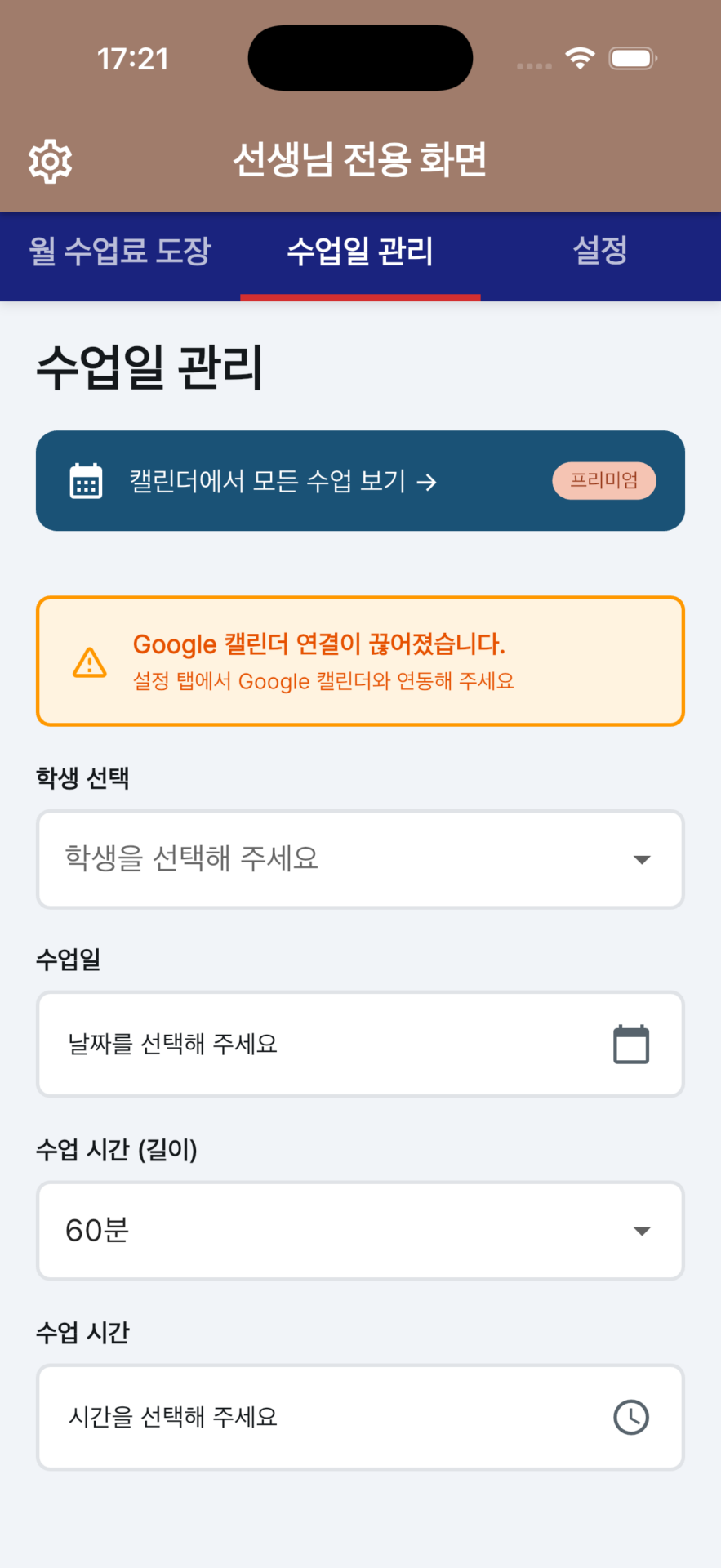
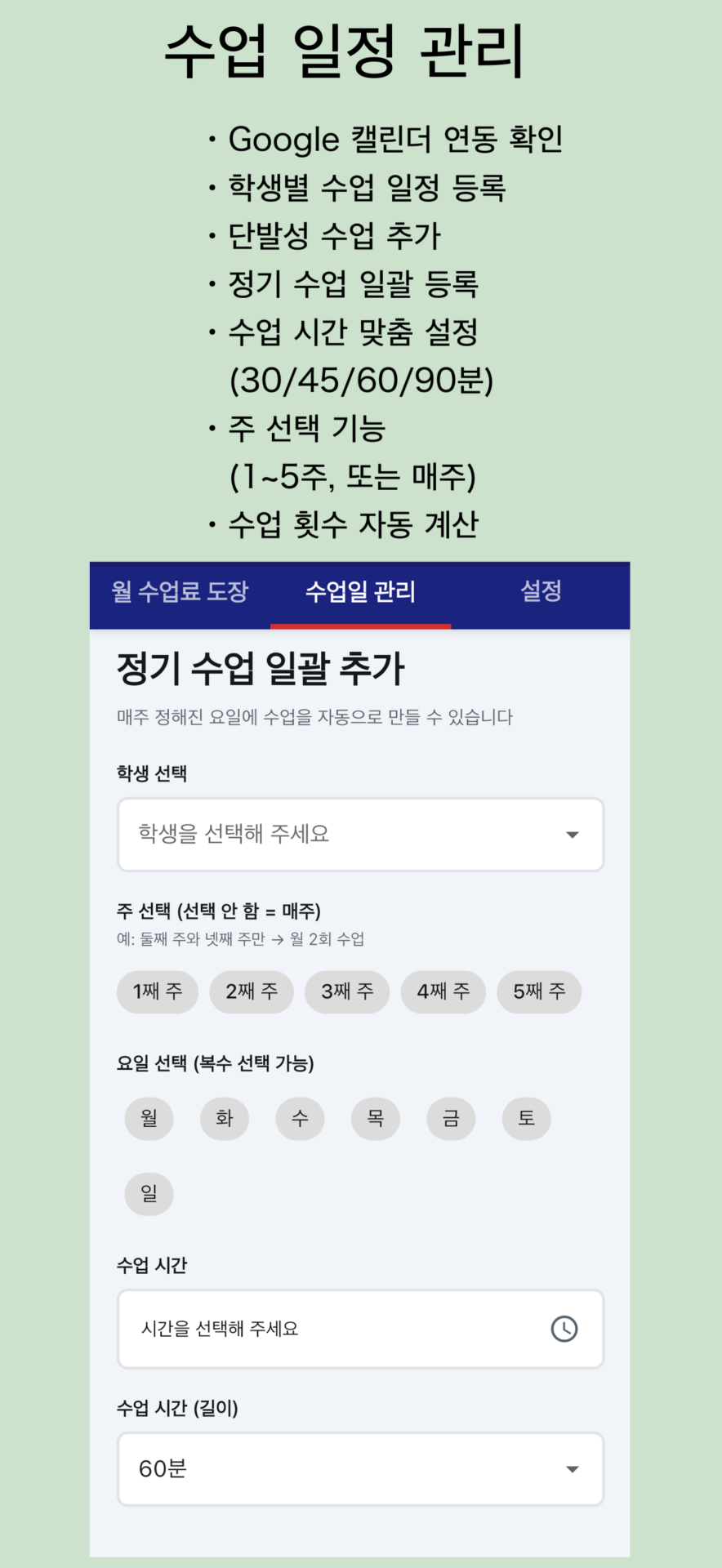
Register lesson dates for each student
Add one-time lessons
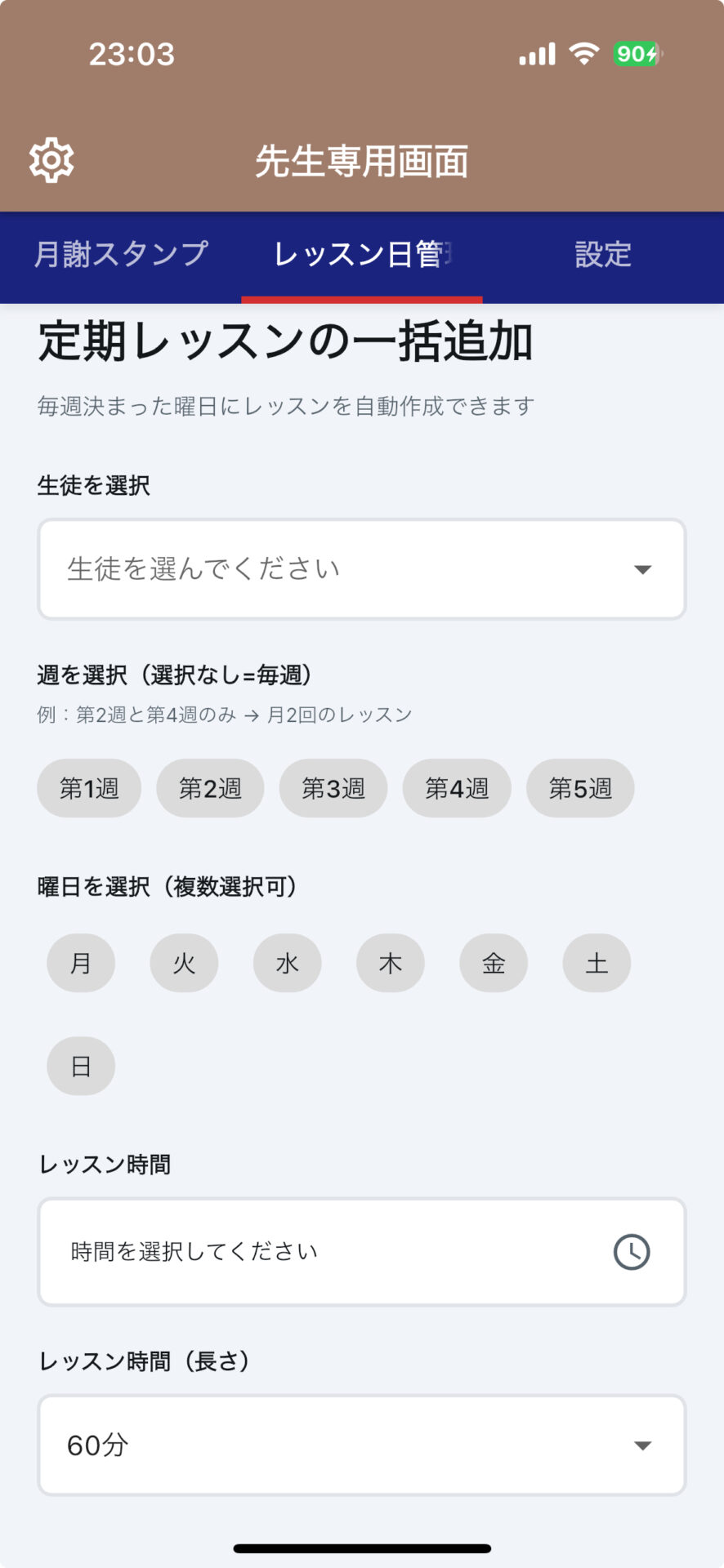
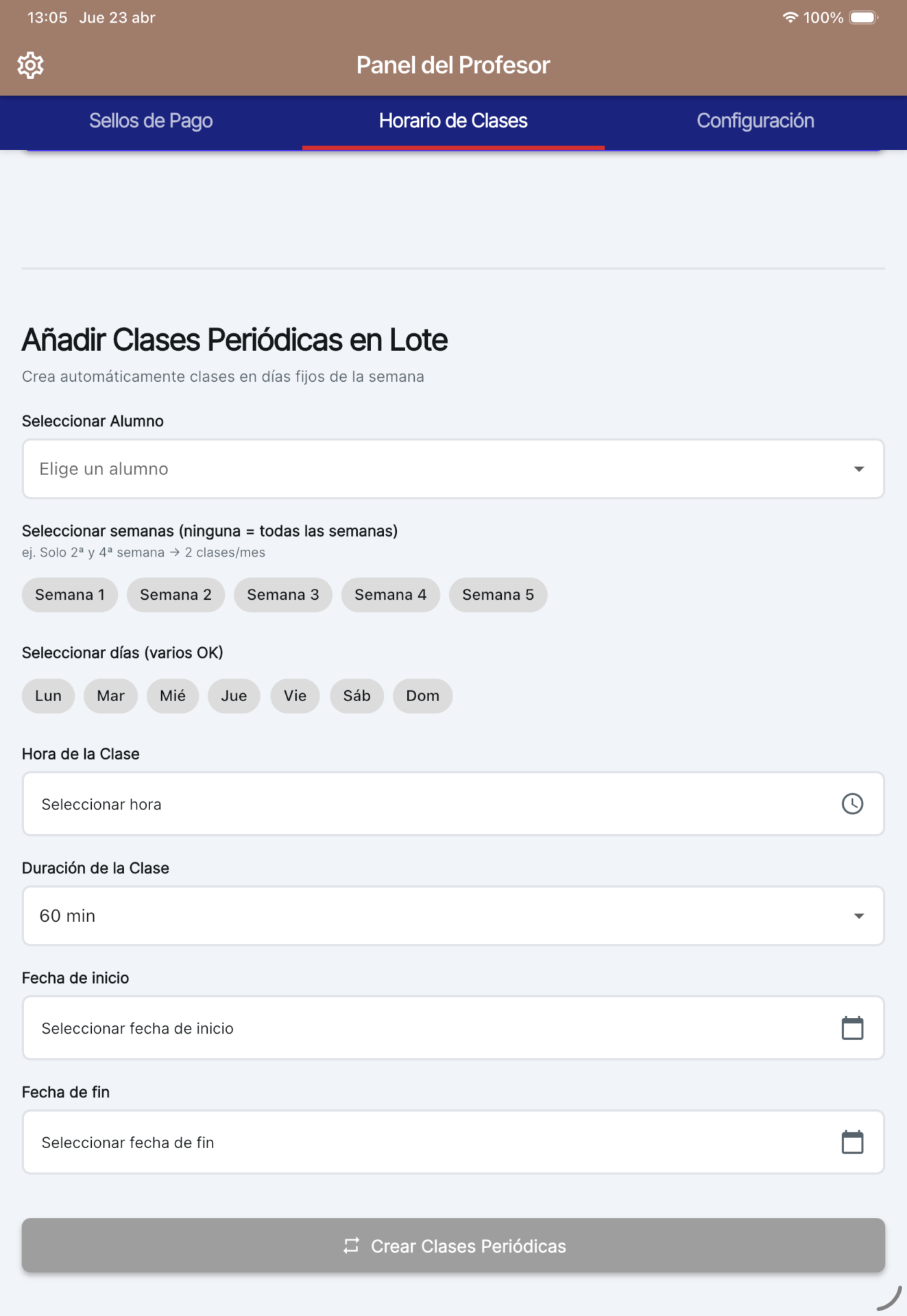
Bulk register recurring lessons
Customize lesson duration (30/45/60/90 minutes)
Week selection feature (Weeks 1–5, or every week)
Automatic calculation of lesson count
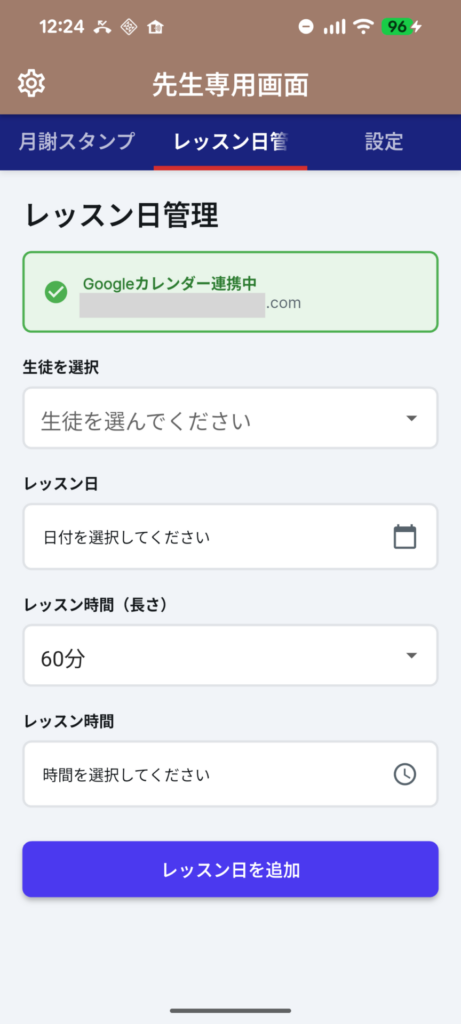
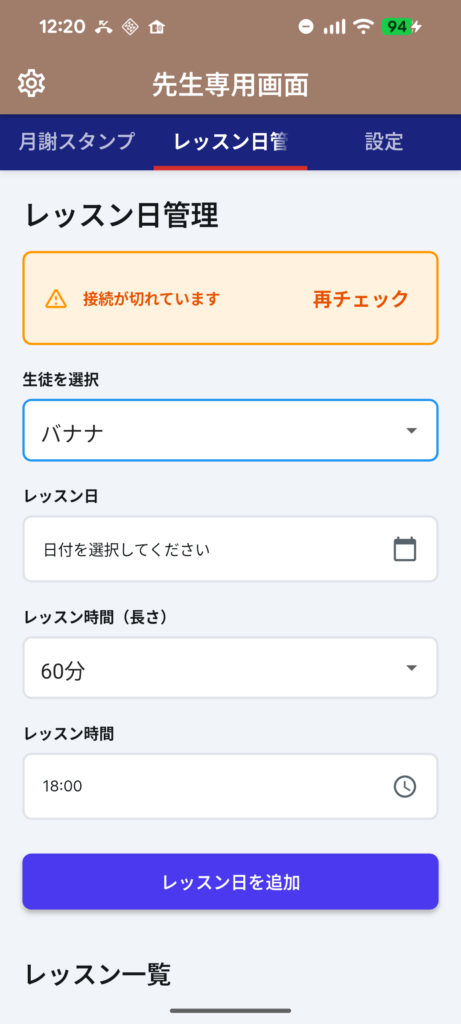
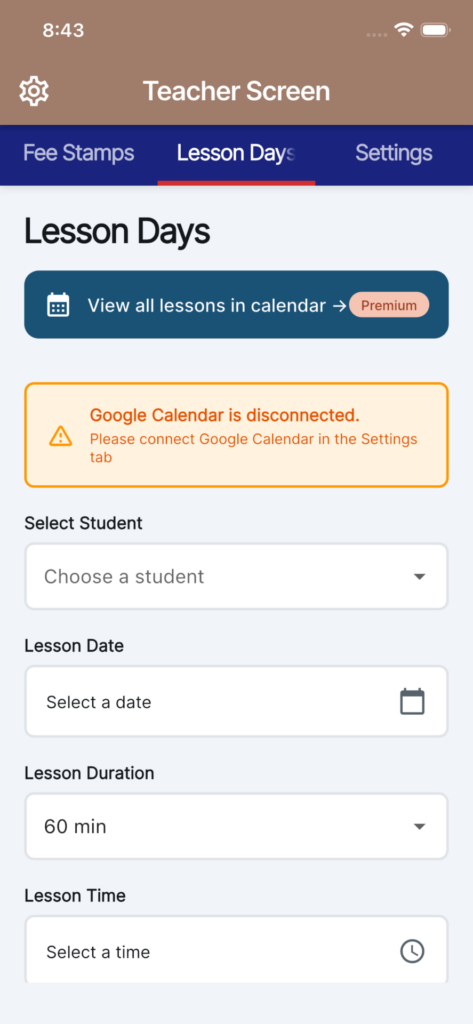
The following shows the differences between when Google Calendar is synced and when it is not
When synced with Google Calendar
When not synced with Google Calendar
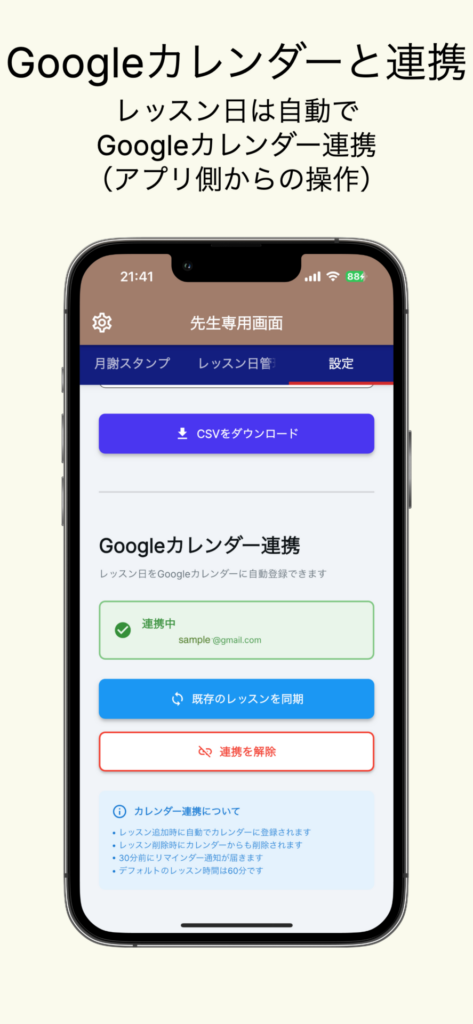
[Full Google Calendar Integration] (App operations → Sync to Google Calendar)
(Please note that there is no synchronization from Google Calendar to the app. Synchronization occurs only when initiated from within the app.)
Automatically add lessons to the calendar when they are created
Automatically remove lessons from the calendar when they are deleted
Bulk sync existing lessons
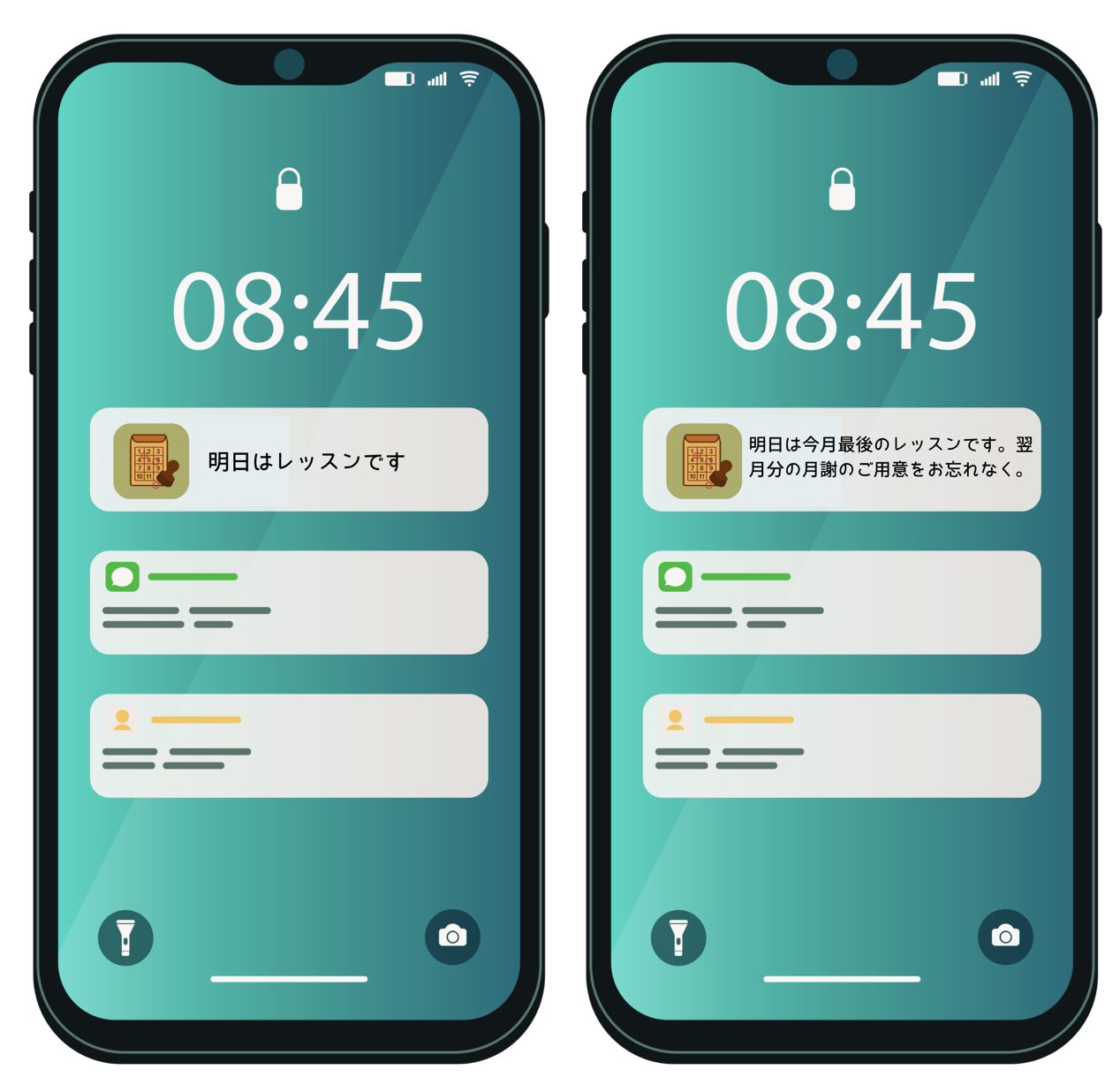
Automatic reminders 30 minutes in advance
Automatically display student names and times
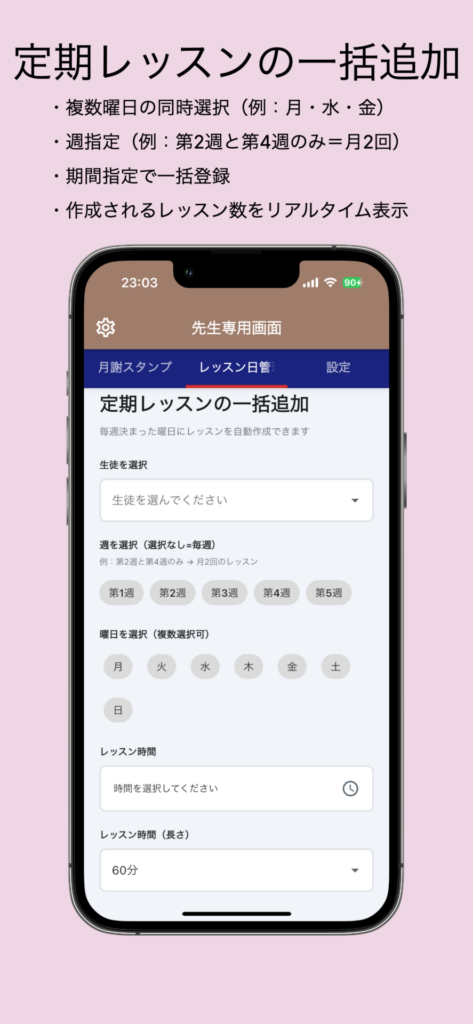
【Useful Features for Regular Lessons】🆕
Select multiple days at once (e.g., Mon, Wed, Fri)
Specify weeks (e.g., only the 2nd and 4th weeks = twice a month)
Bulk registration by specifying a date range
Real-time display of the number of lessons created
【Classroom Management】
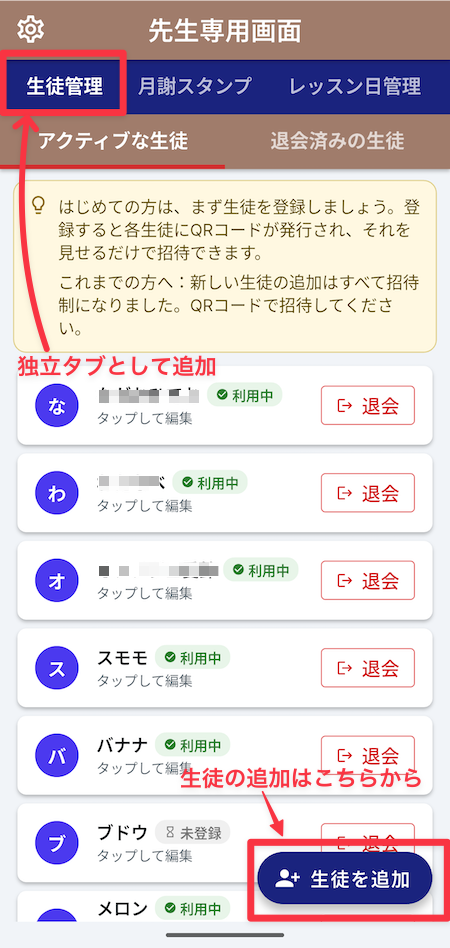
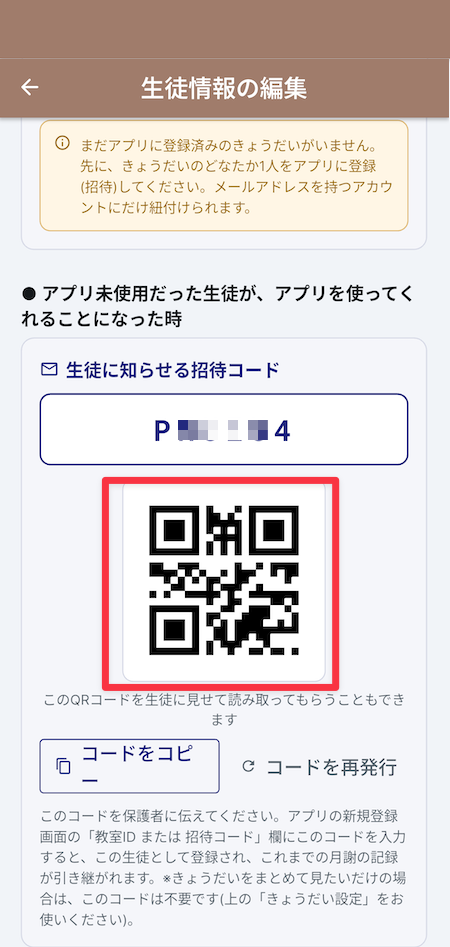
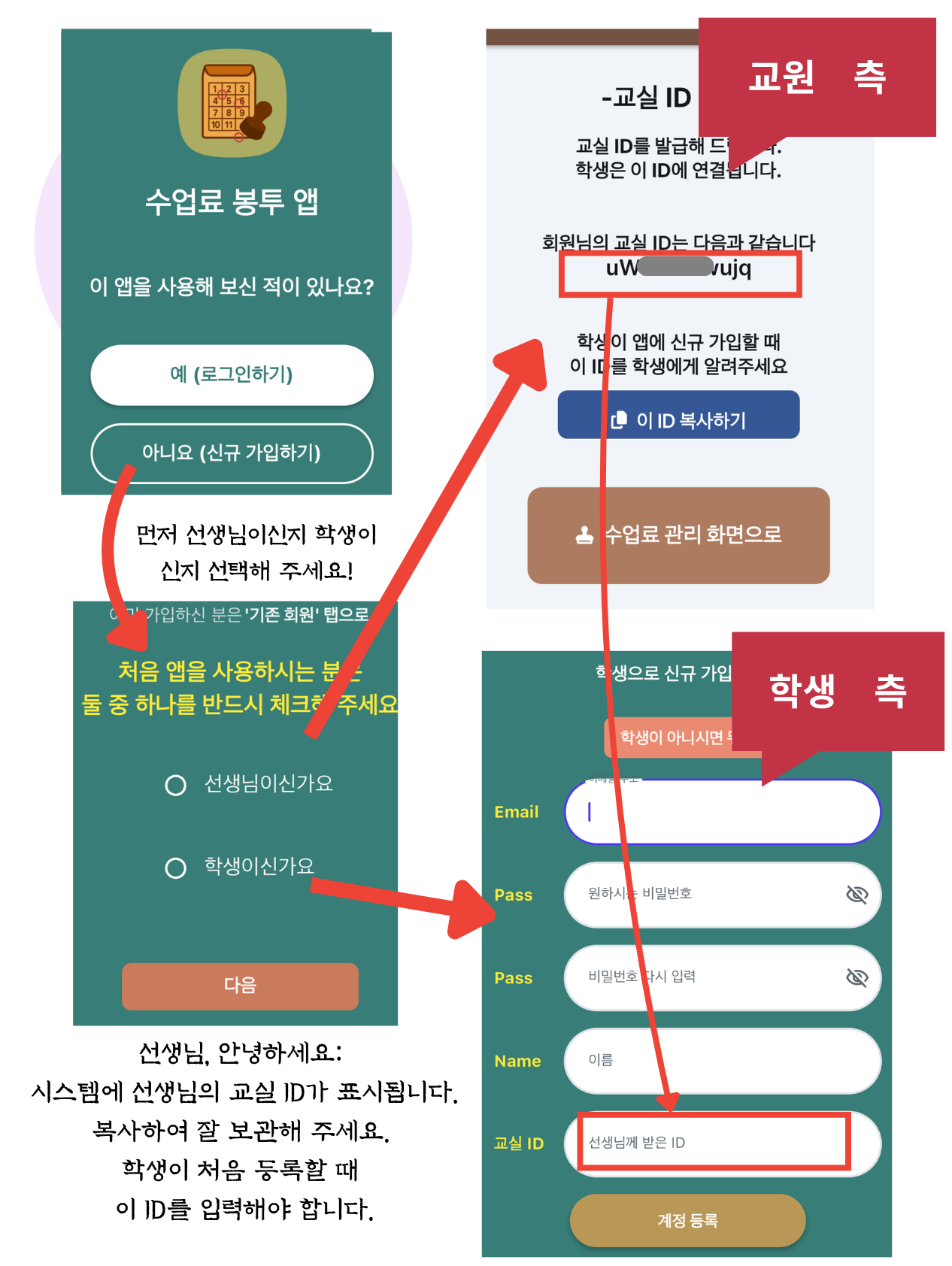
Class ID Issuance: The teacher issues a single class ID, and students use that ID to join the class. This makes managing each class a breeze.
Class-by-Class Separation: Data is managed separately using class IDs. Even with multiple classes, data won’t get mixed up, so you can rest assured.
■ Key Features for Students and Parents
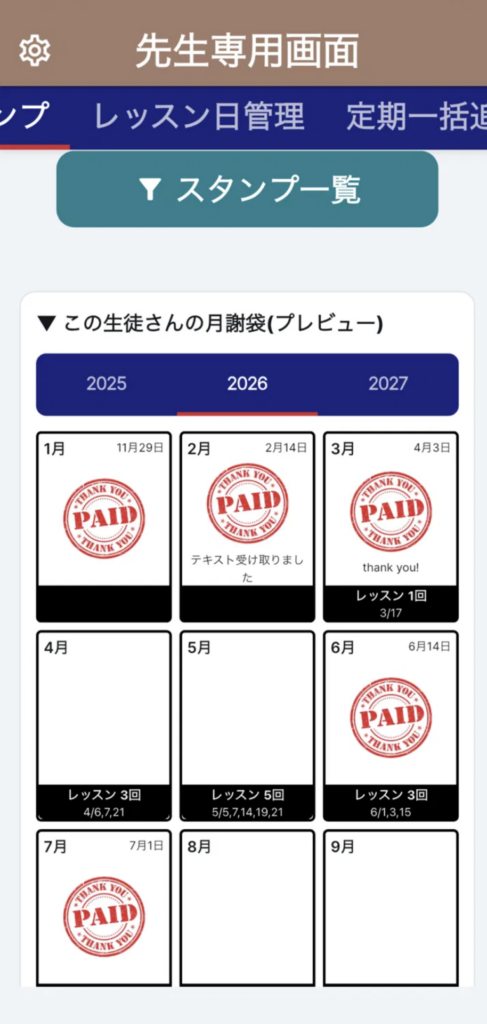
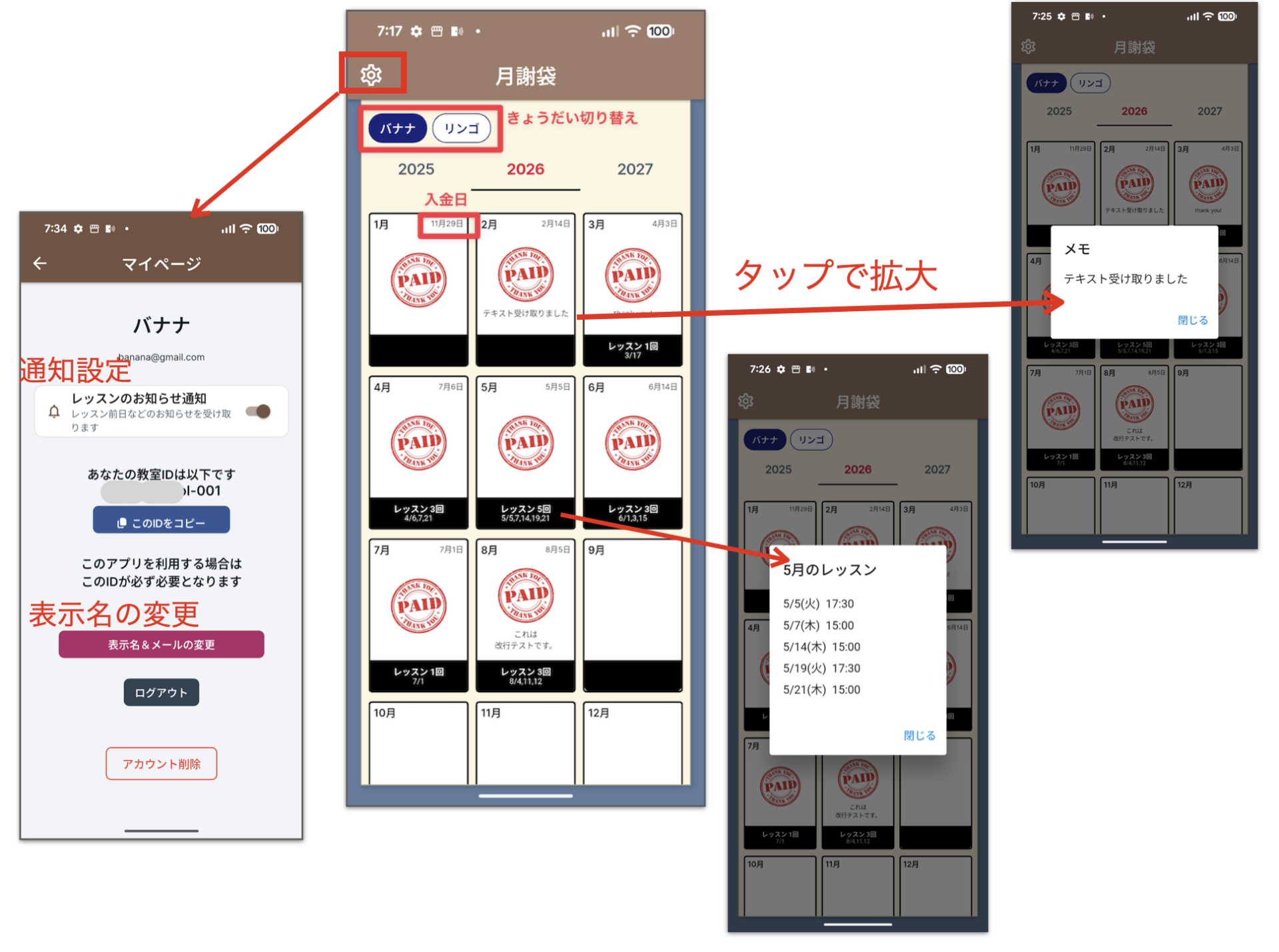
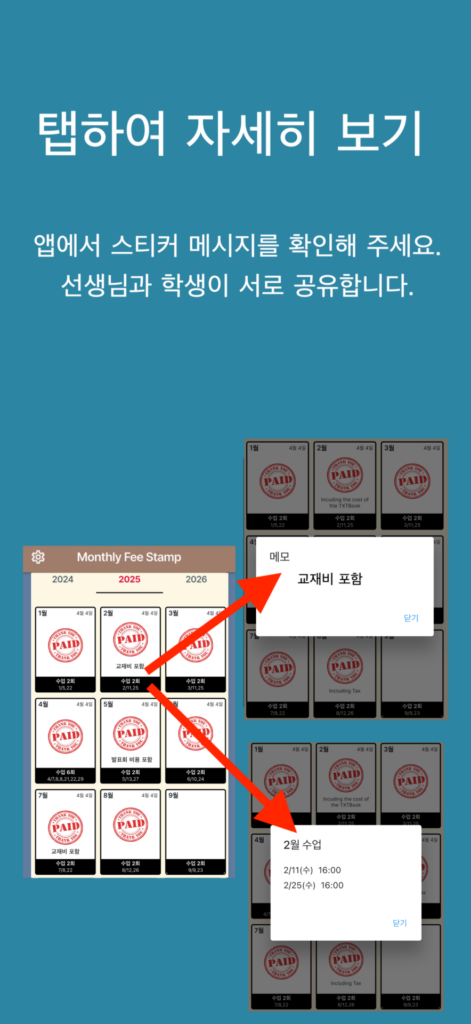
The reassurance of “just like paper”: With monthly receipt stamps and dates clearly displayed, it’s just as easy to read as a paper tuition envelope.
Check anytime: As long as you have your smartphone, you can check your payment status even when you’re out and about. This reduces worries about misplacing or losing envelopes.
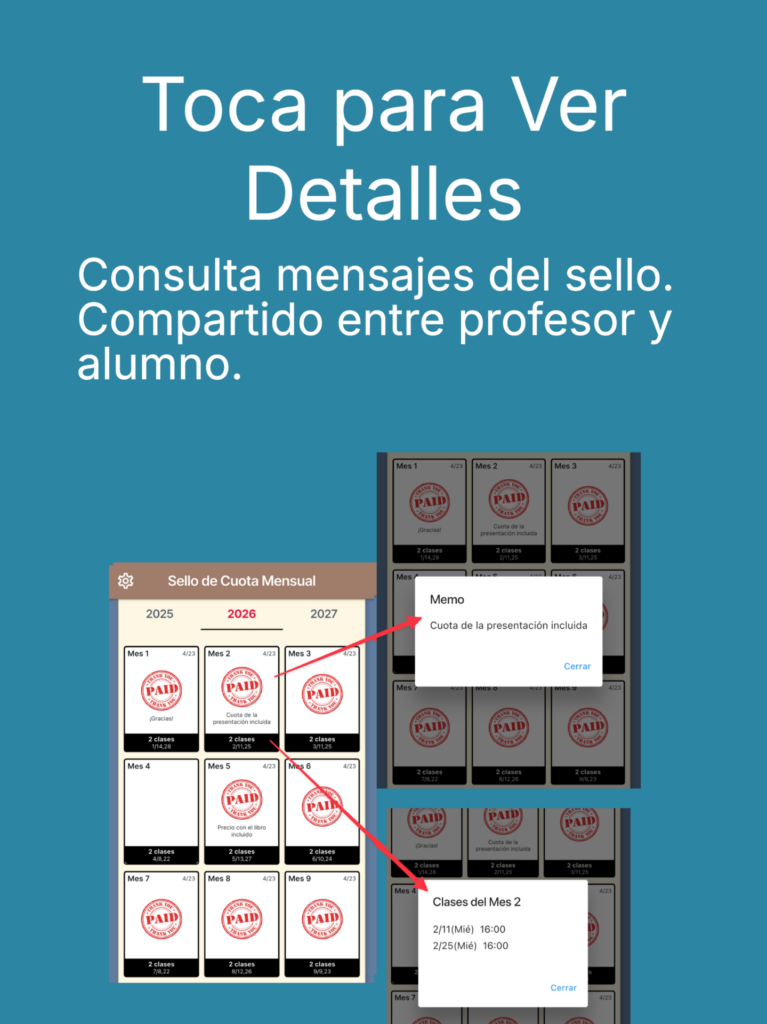
Easy to communicate: Notes on the stamps (e.g., “includes recital fee”) let you know immediately if there are any additional charges.
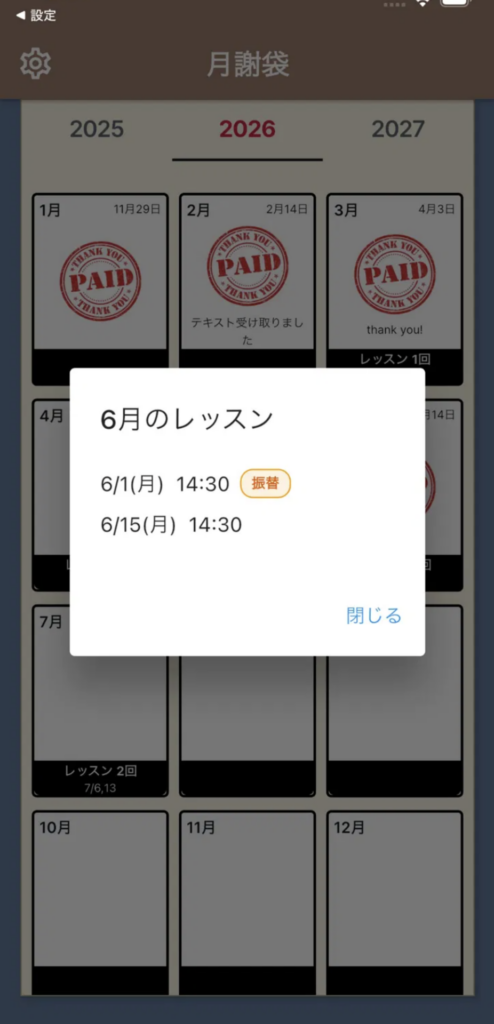
You can check your monthly lesson schedule. (How many lessons were there this month? Tap to zoom in and see the exact times.)
■ Premium Features (One-time purchase: 800 yen)
The basic features are completely free to use. For teachers who need additional convenient features, we offer the following premium features for ¥800 (one-time purchase).
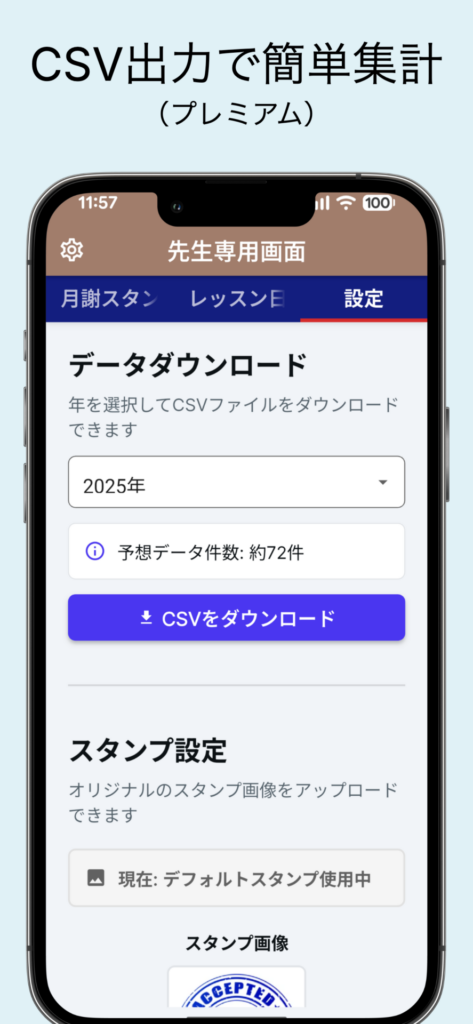
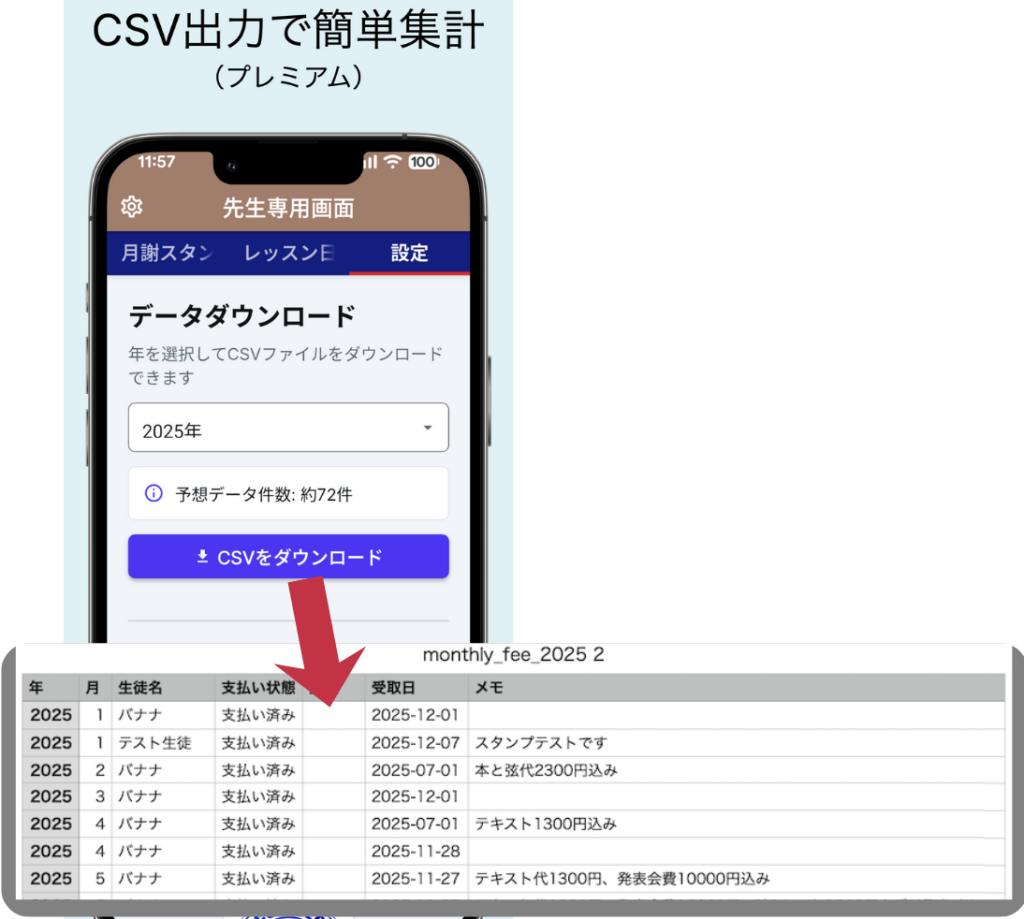
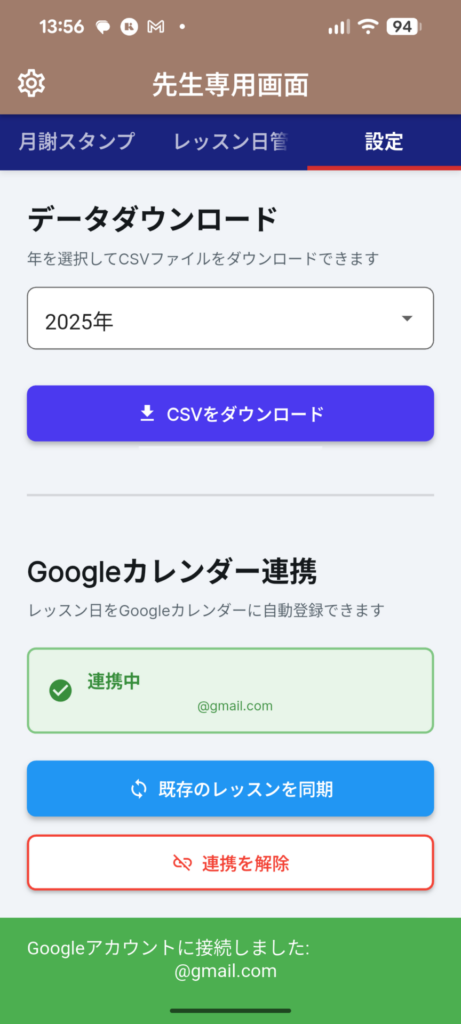
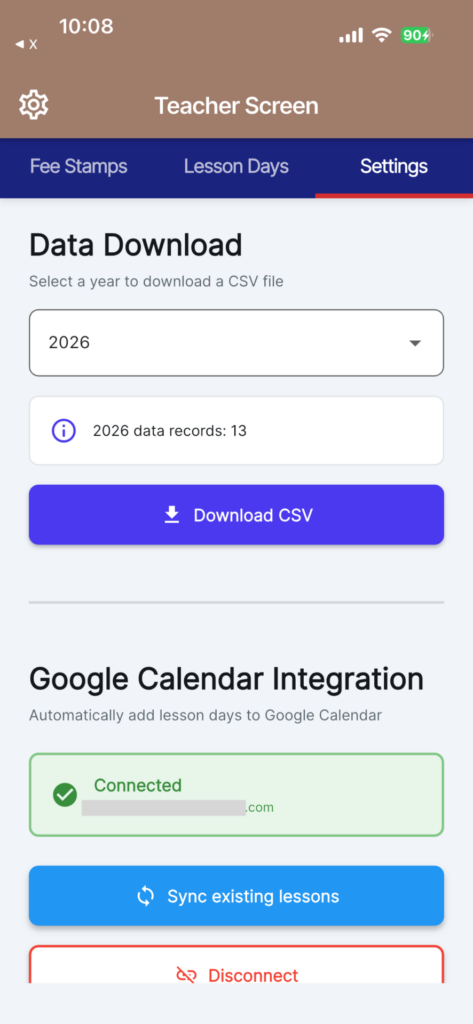
Download CSV
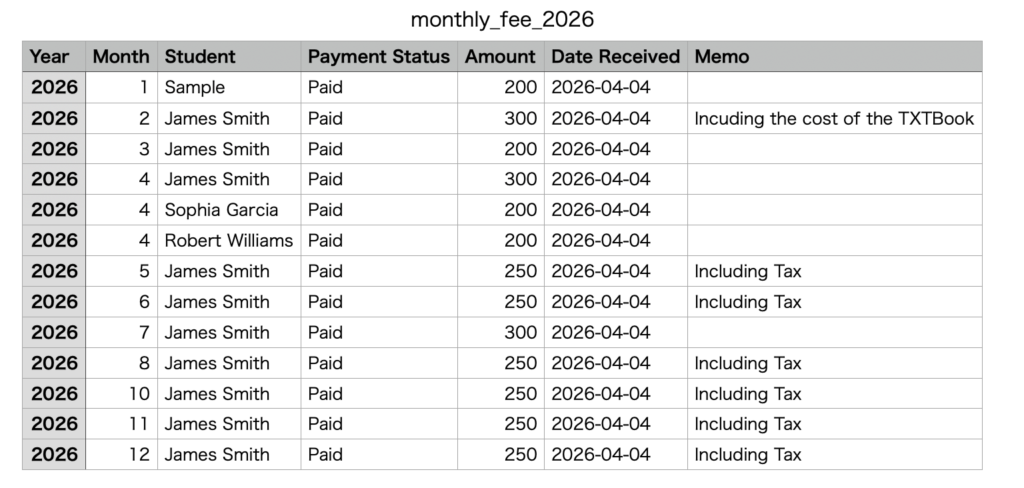
Download CSV: Download your entire stamp history in CSV format.
This allows you to compile and analyze the data in Excel or Google Sheets.
It’s useful for tax returns and year-end settlements.
It’s also easy to import into accounting software.
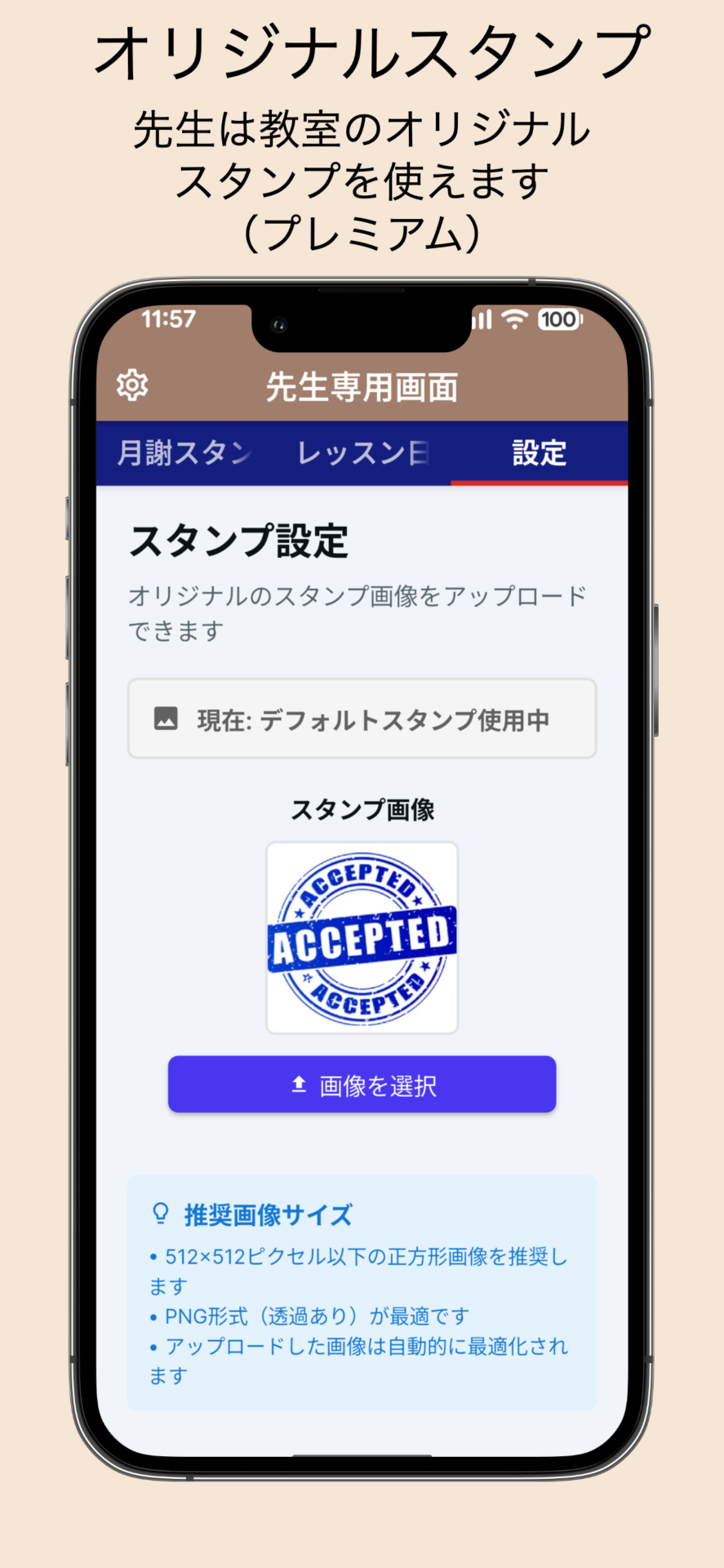
Custom Stickers
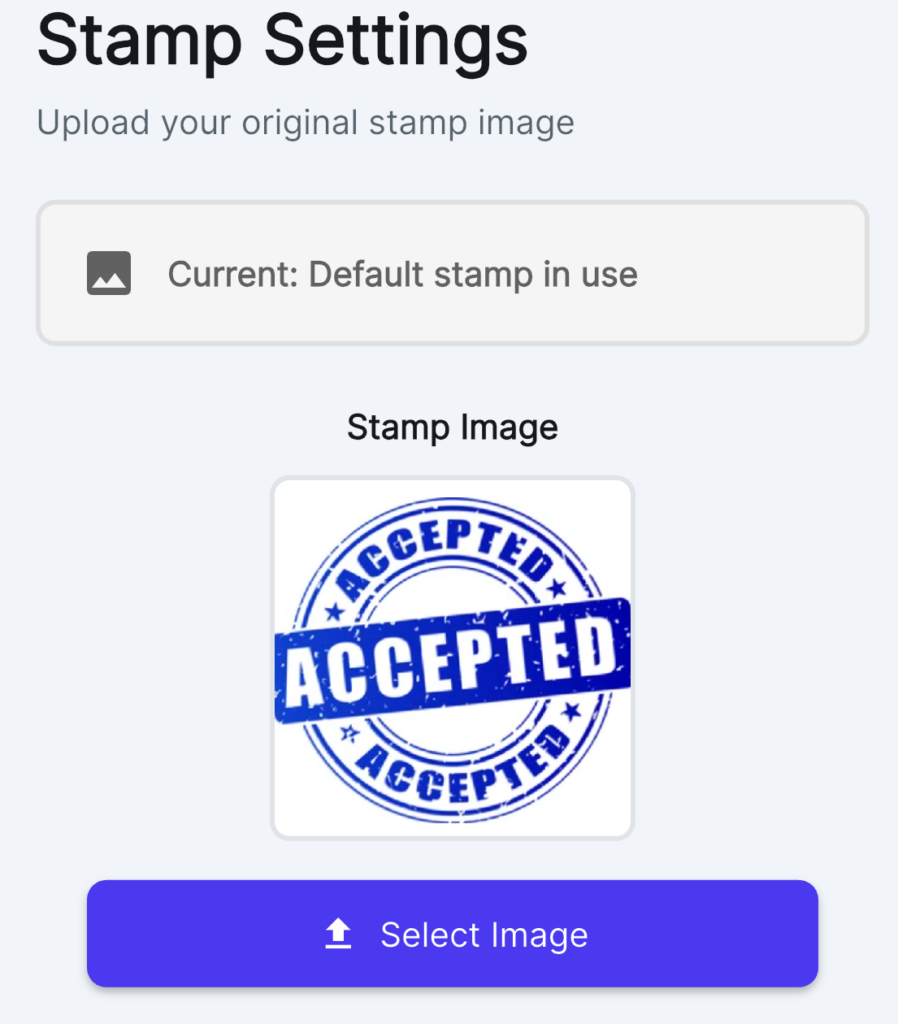
Custom Stamps: You can set your own custom stamp images for your school.
Use your school’s logo or illustrations to create more personalized tuition envelopes.
Effective for branding
Increase student satisfaction
Premium features are available only to teachers
※Premium features are available only to teachers; students and parents can continue to use the service for free.
■ How to Use (For Teachers)
1) Register an account → Generate a classroom ID 2) Share the classroom ID with students (or their parents) 3) Once students join, simply tap the “Stamp” button each time you collect payment 4) Filter by year, month, or student to check for outstanding payments 5) Use premium features to further streamline your tracking and management as needed
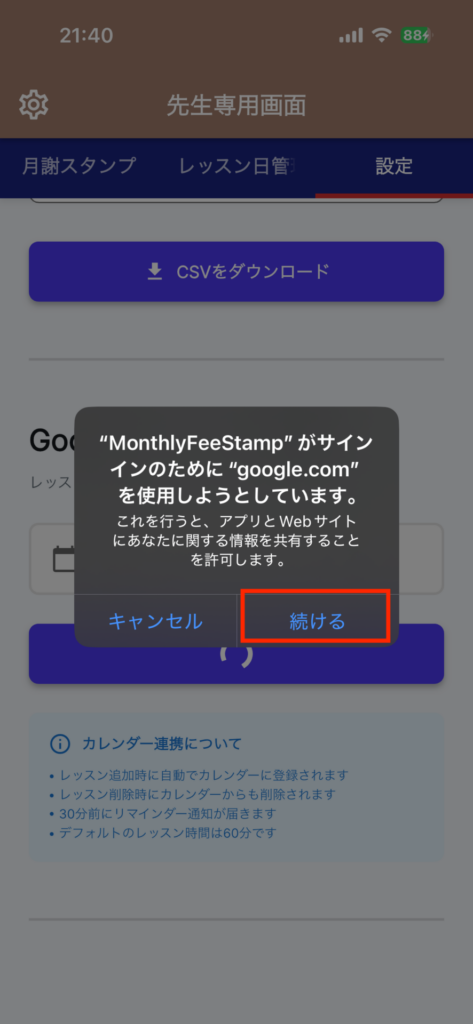
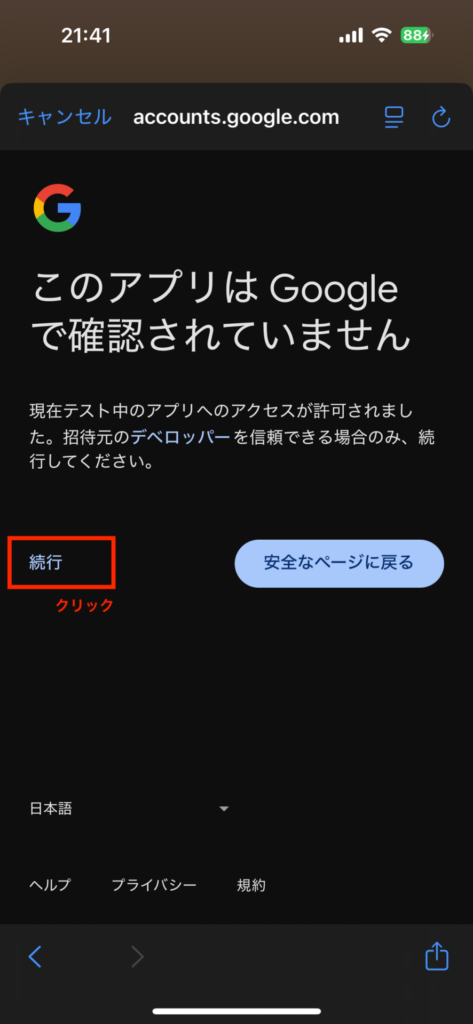
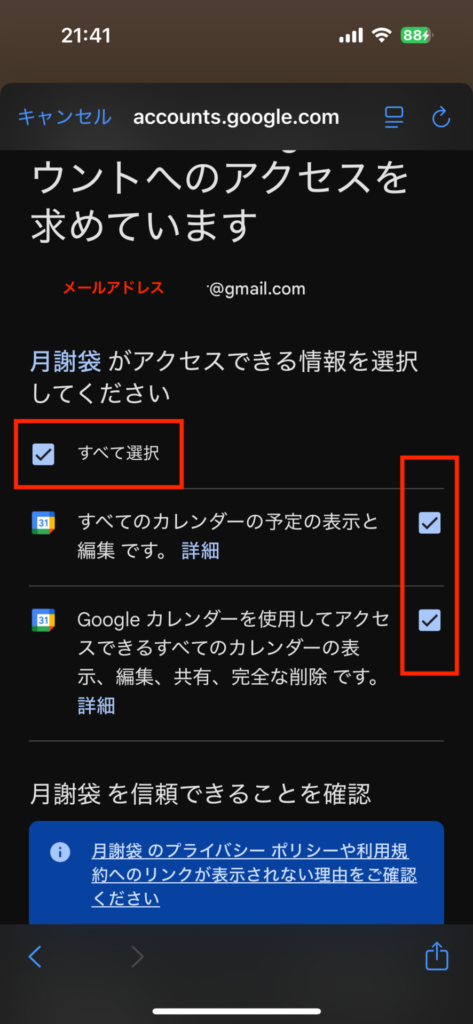
【How to Set Up Google Calendar Integration】
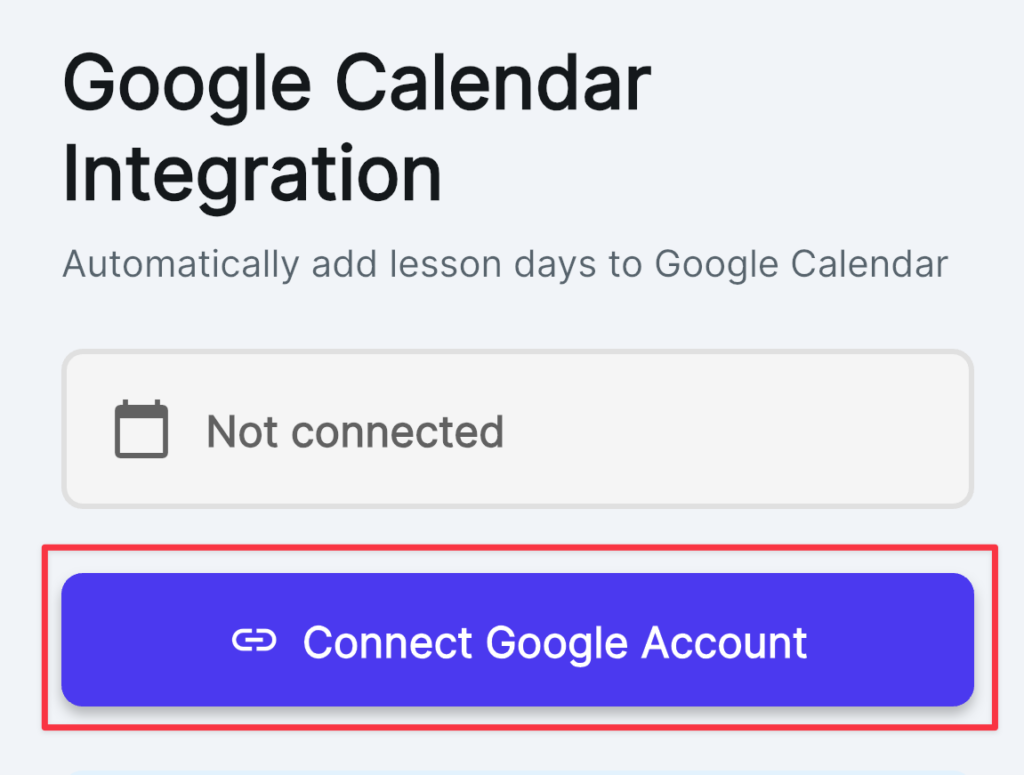
Go to the Settings screen and select “Connect to Google Account”
Grant permissions
Lessons are automatically added to your calendar when you add them
■ How to Use (Students/Parents)
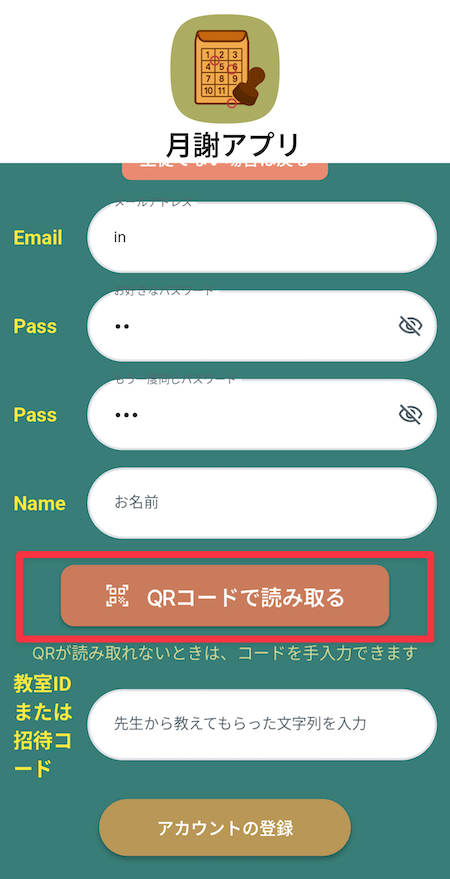
1) Register an account → Enter the classroom ID provided by your instructor 2) Check your monthly tuition envelope in the app 3) Track your progress using the stamp’s date and notes 4) Tap the short message below the stamp to enlarge it 5) Tap the lesson date to view details
■ More convenient than paper payment envelopes! Perfect for these situations
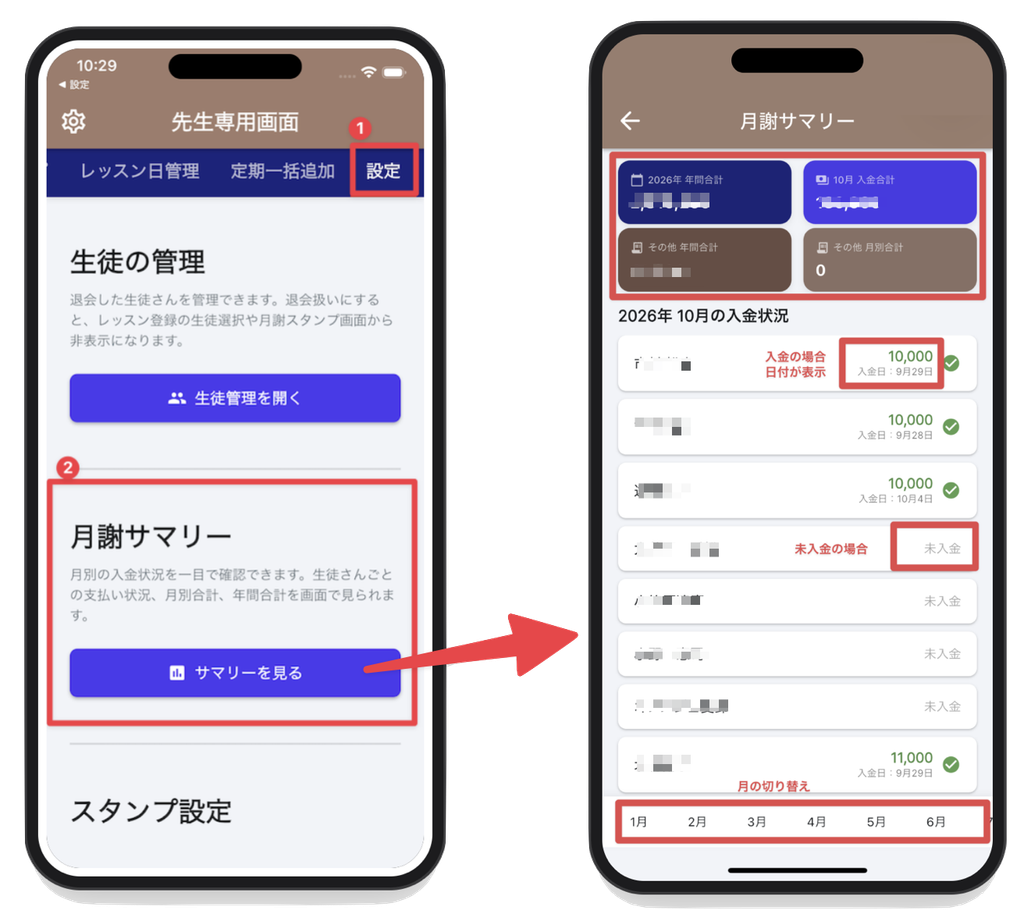
I want to quickly review payment confirmations for the beginning of the month at a glance
I want to manage lesson schedules using Google Calendar
I want to register recurring lessons in bulk (e.g., twice a month, three times a week)
I want to ensure additional fees (such as recital fees or material costs) are communicated accurately without having to write them down every time
I want to review the settlement status in bulk at the end of the term
I want parents to be able to immediately check whether payments have been made or not
Analyze year-end summary data in Excel (Premium feature)
■ Frequently Asked Questions
What if I stamp it by mistake?
You can easily make corrections by using the “Undo” function. You can also manage dates and notes together.
Can I use a different classroom on the same device?
Since teachers are managed by classroom ID, you can rest assured even if you have multiple classrooms. Students join using the designated classroom ID.
Will my data be preserved if I switch devices?
If you log in with your account, you can continue using your previous stamp history.
What is the scope of the free version?
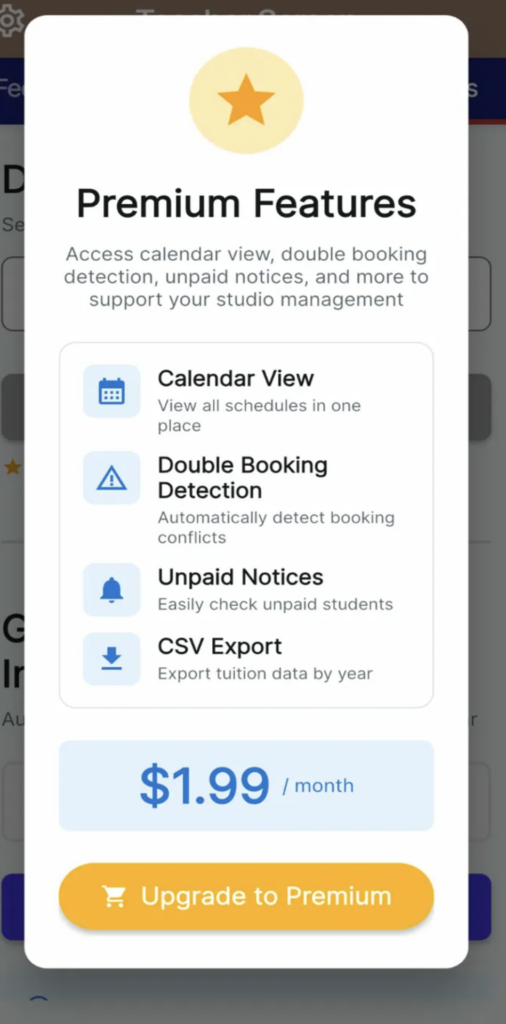
Basic tuition management features (such as creating stamps, viewing history, and filtering), lesson management, and Google Calendar integration are completely free. Additional features—such as calendar overviews, double-booking detection, tracking students with outstanding payments, email sending, CSV export, and custom stamps—are available as paid options.
Do students and parents also need to pay?
No. The premium features are available only to teachers; students and parents can use the service completely free of charge.
In what kind of classrooms can it be used?
This service is available for all types of privately run classes, including guitar, piano, yoga, dance, English conversation, calligraphy, and abacus lessons.
■ About Security
・All data is securely managed in Firebase ・Access to Google Calendar is kept to the absolute minimum ・Data is separated by classroom ID to prevent information from other classrooms from being mixed ・We do not share personal information with third parties ・Privacy Policy: https://sinqwell.net/privacy-policy/ ・Terms of Service: https://sinqwell.net/terms-of-service/
Compatible Devices
・iPhone(iOS 13.0-) ・iPad ・Android(Android 5.0-)
■ Our Development Philosophy
“Paper tuition envelopes” have long been a beloved tradition. We’ve digitized this system in a way that’s easy on both teachers and students, preserving its best features while reducing the anxiety of losing them and the hassle of tallying payments. It works just like the original—only the hassle is gone. That’s the “Tuition Envelope” app.
A little more convenient than paper tuition envelopes. Starting today, make collecting and tracking payments even simpler.
🎉 Try it for free now!
Streamline tuition management and lesson scheduling to make running your school even smoother. Try the free features today.
Monthly Fee Stamp(Sobre de Cuotas)
¡Con「Monthly Fee Stamp」haz que la gestión de tu academia sea más eficiente! Conservando las ventajas del sobre de cuotas en papel, es una app de gestión de cuotas y horarios de clases creada para profesores que dirigen academias de forma individual. Guitarra, piano, yoga, natación, gimnasia, danza, música, conversación en inglés, dibujo, caligrafía, ceremonia del té, arreglo floral, etc., se puede usar en todo tipo de academias. Entorno de desarrollo: FlutterFlow→Flutter Gratis (sin anuncios) (solo el profesor tiene funciones premium)
「Monthly Fee Stamp」es una sencilla app de apoyo para asistencia y cobro que traslada el「sobre de cuotas en papel」tal cual al móvil. Cuando el profesor recibe la cuota, solo tiene que「poner el sello」. En el sello se pueden añadir notas como「incluye cuota de recital」「incluye material」, y la fecha de cobro se registra automáticamente. Incluso si se sella por error, se puede cancelar con un toque. El alumno (o su tutor) puede consultar el estado de pago en cualquier momento en la app, con la misma sensación que un sobre de cuotas en papel. Más claro que el papel, no se pierde y no hay que buscarlo. Esa experiencia「familiar del sobre de cuotas」trasladada tal cual al móvil.
¡El profesor confirma la cuota con un mensaje sellado, y el alumno consulta el estado de pago en la app con el aspecto original del sobre de cuotas! Una app práctica que también permite compartir las fechas de clase.
🎉 ¡Integración completa con Google Calendar! Registra automáticamente el horario de clases y también puedes registrar clases periódicas de una vez. Para clases de 2 veces por semana, etc., puedes especificar la 2ª・4ª semana. También puedes elegir duraciones de clase de 30/45/60/90 minutos. ¡La gestión de tu academia será aún más cómoda!
¿Qué es「Monthly Fee Stamp」?
Una app de gestión de cuotas y horarios de clases creada para profesores que dirigen academias de forma individual. Guitarra, piano, yoga, danza, etc., se puede usar en todo tipo de academias. Conservando las ventajas del「sobre de cuotas en papel」, reduce la inquietud por pérdidas y la molestia del recuento, digitalizándolo de una forma amigable tanto para profesores como para alumnos. Mediante la integración con Google Calendar, la gestión del horario de clases también se automatiza.
■ Por qué la gestión de cuotas se vuelve más fácil
No hay que escribir ni buscar La fecha de cobro se registra automáticamente y la nota se introduce de una vez. Ya no hace falta revolver papeles para comprobar el historial.
No se te escapa ningún「impago」 Filtrando por año/mes/alumno, sabes al instante quién no ha pagado. Mejora la precisión de los avisos.
Ideal para la gestión de academias Los datos se separan por ID de aula, así que también puedes usar varias academias con tranquilidad (academia de guitarra, de piano, de ábaco, etc.).
Más cómodo y seguro que el papel Los datos se guardan en la nube. Aunque cambies de dispositivo, iniciando sesión con tu cuenta puedes continuar usándolo de inmediato.
■ Funciones principales para el profesor
【Gestión de sellos de cuota】
Registro de sello: al recibir la cuota, selecciona al alumno y pon el sello. La fecha de cobro se introduce automáticamente y también puedes registrar una nota.
Cancelación sencilla: si te equivocas o corriges el importe, cancelando el sello se restablece al instante.
Historial visible: el historial de operaciones de sello se guarda automáticamente. Quién, cuándo y con qué nota se cobró, todo de un vistazo.
Filtro potente: puedes filtrar por año/mes/alumno. Encuentra al instante a los alumnos con impago y evita olvidos en los recordatorios.
【Gestión de fechas de clase】
Registro de fechas de clase por alumno
Añadir una clase individual
Registrar clases periódicas de una vez
Duración de clase personalizable (30/45/60/90 minutos)
Función de selección de semana (semanas 1〜5, o cada semana)
Cálculo automático del número de clases
【Integración completa con Google Calendar】(operación en la app→sincroniza con Google Calendar)
(*Tenga en cuenta que no hay sincronización de Google Calendar →app. Es una sincronización unidireccional operada desde la app.)
Al añadir una clase se registra automáticamente en el calendario
Al eliminar una clase se quita automáticamente del calendario
Las clases existentes se sincronizan de una vez
Aviso automático 30 minutos antes
Muestra automáticamente el nombre del alumno y la hora
【Funciones prácticas para clases periódicas】
Selección simultánea de varios días (ej.: lunes・miércoles・viernes)
Especificar la semana (ej.: solo la 2ª y la 4ª semana=2 veces al mes)
Registrar de una vez durante un periodo determinado
Muestra en tiempo real el número de clases que se crearán
【Gestión de aulas】
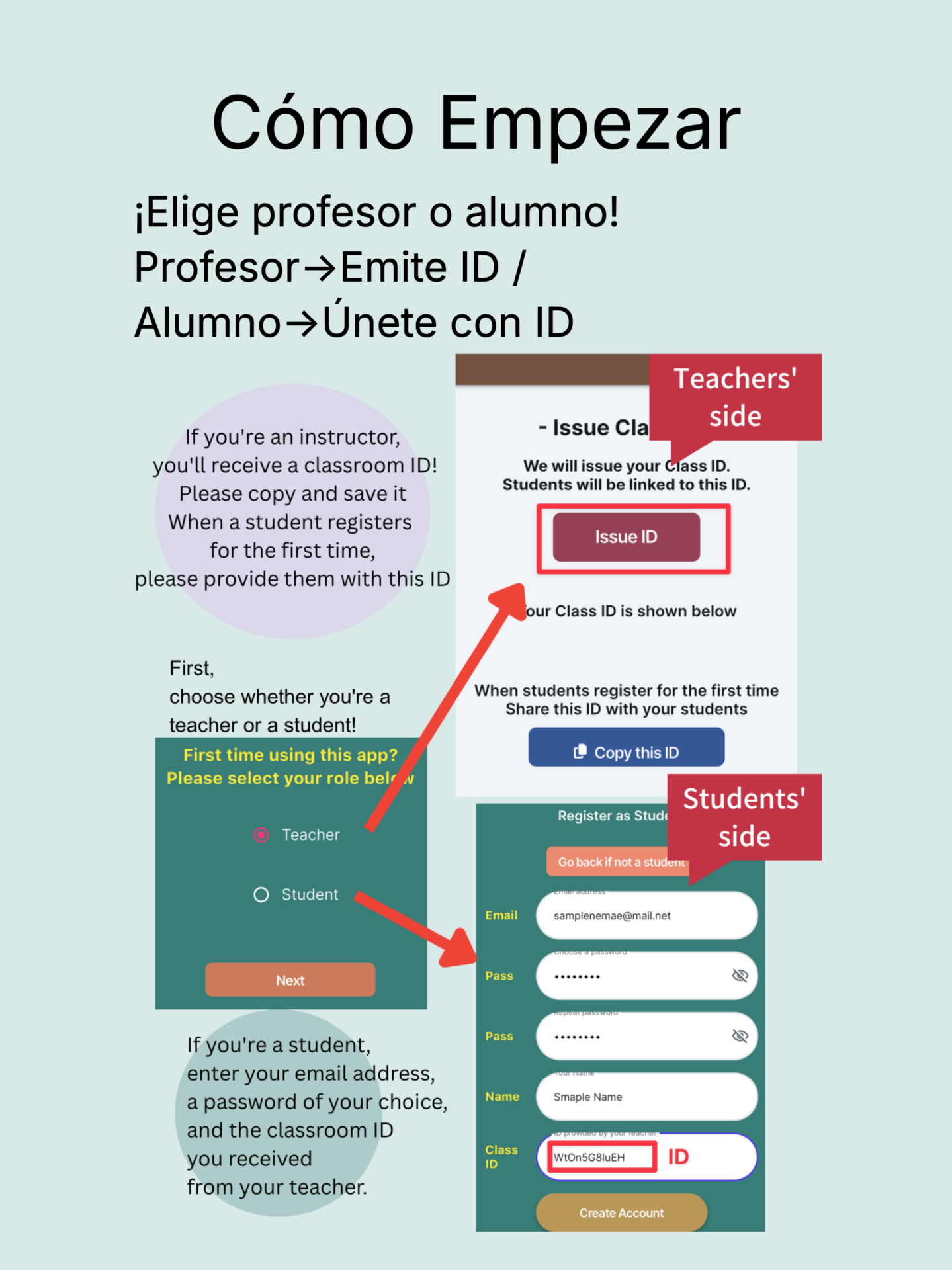
Emisión de ID de aula: el profesor emite un único ID de aula y los alumnos se unen al aula con ese ID. La gestión de cada grupo es fluida.
Separación por aula: los datos se gestionan separados por ID de aula. Aunque tengas varias academias no se mezclan, puedes usarlas con tranquilidad.料。多個教室也不會混淆,安心使用。
■ Funciones principales para alumnos y tutores
Tranquilidad「igual que el papel」: los sellos de cobro y las fechas de cada mes aparecen en fila, igual de claros y legibles que un sobre de cuotas en papel.
Consulta en cualquier momento: solo con el móvil puedes consultar el estado de pago aunque estés fuera. Se reduce la preocupación por olvidar o perder el sobre.
Comunicación cómoda: gracias a la nota del sello (incluye cuota de recital, etc.), sabes al instante si hay algún coste adicional.
Puedes consultar las fechas de clase de cada mes. (¿Cuántas clases hubo este mes? Al tocar se amplía aún más y puedes confirmar con detalle hasta la hora.)
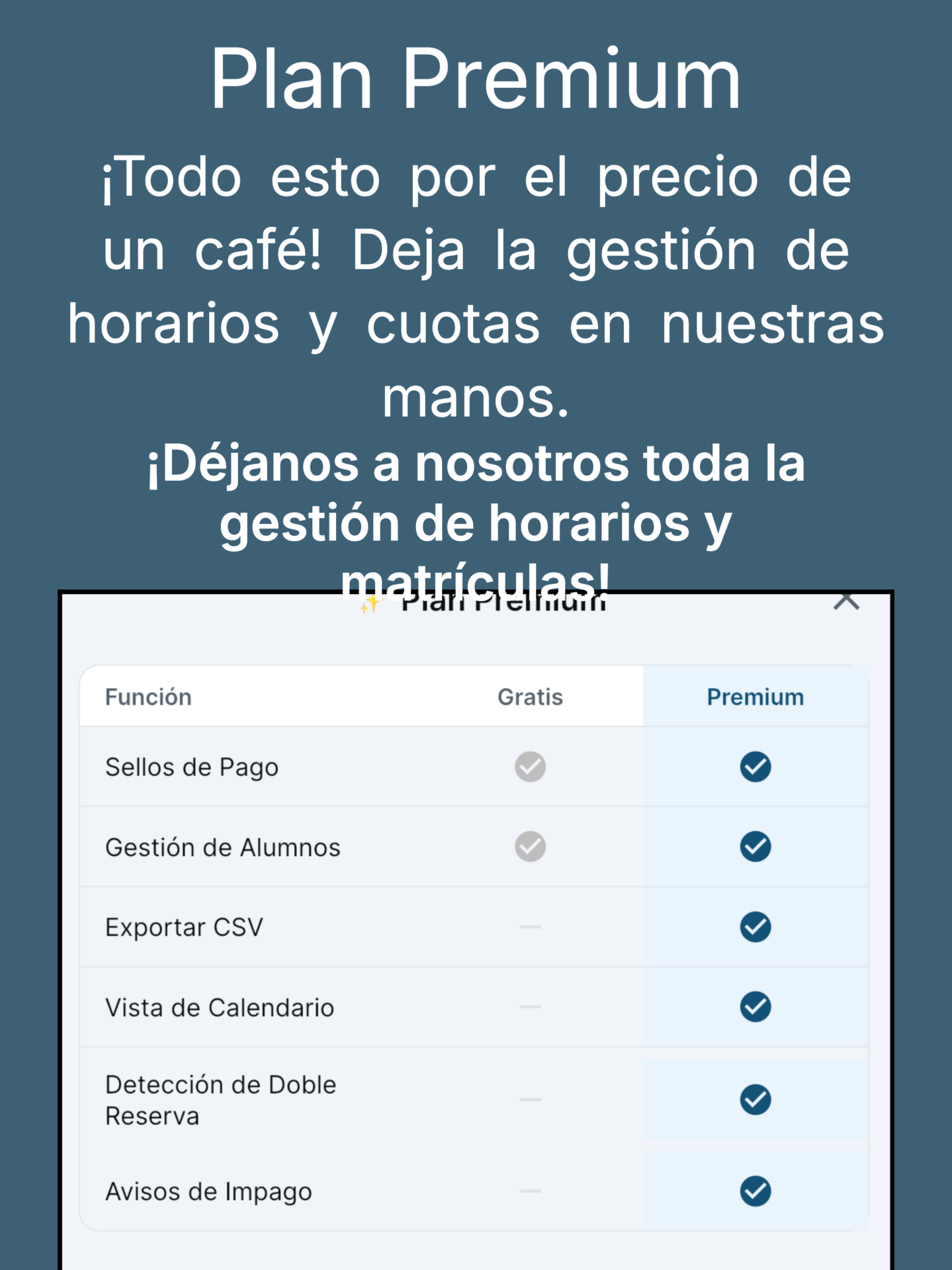
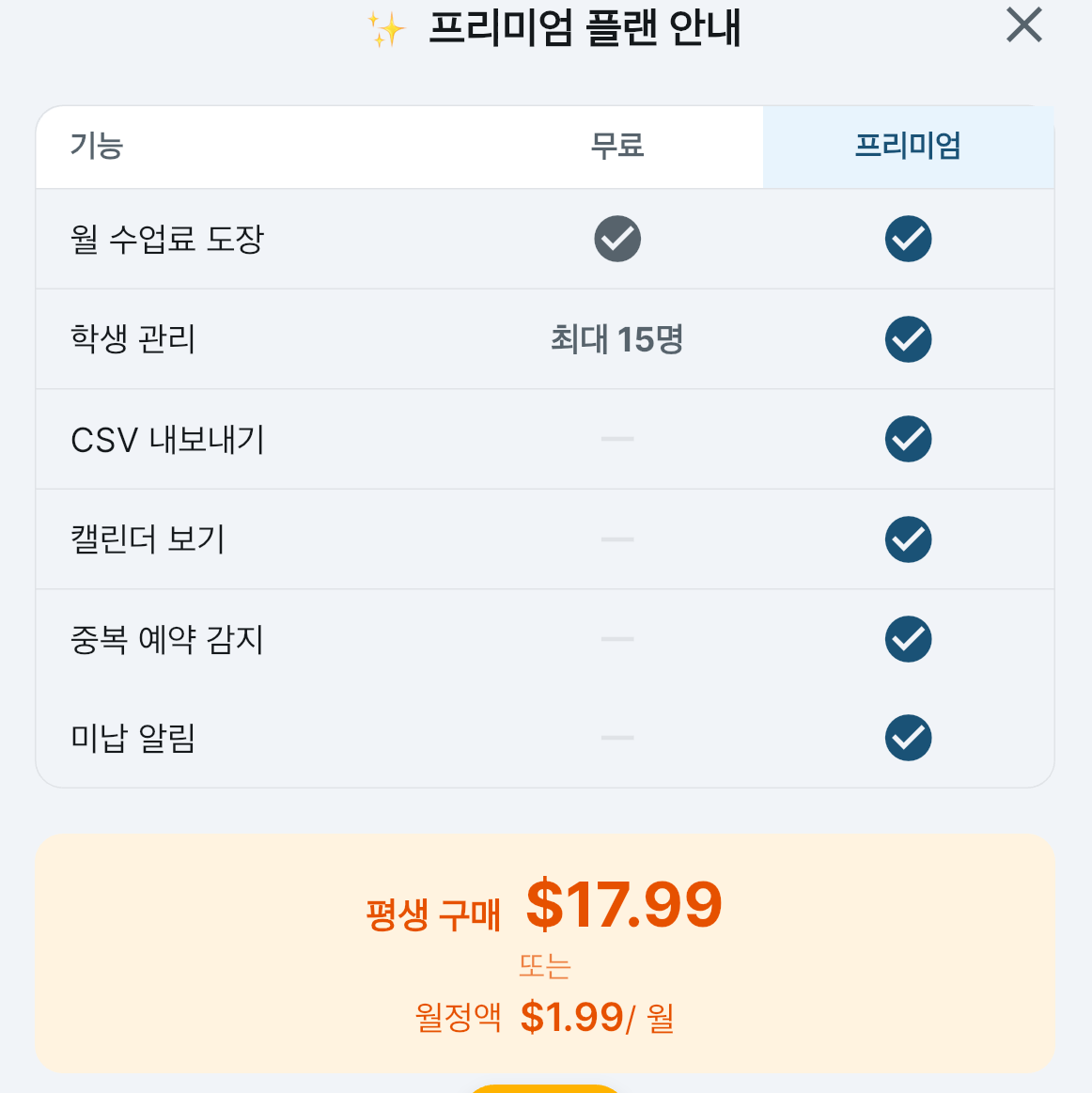
■ Funciones premium (compra única $17.99)
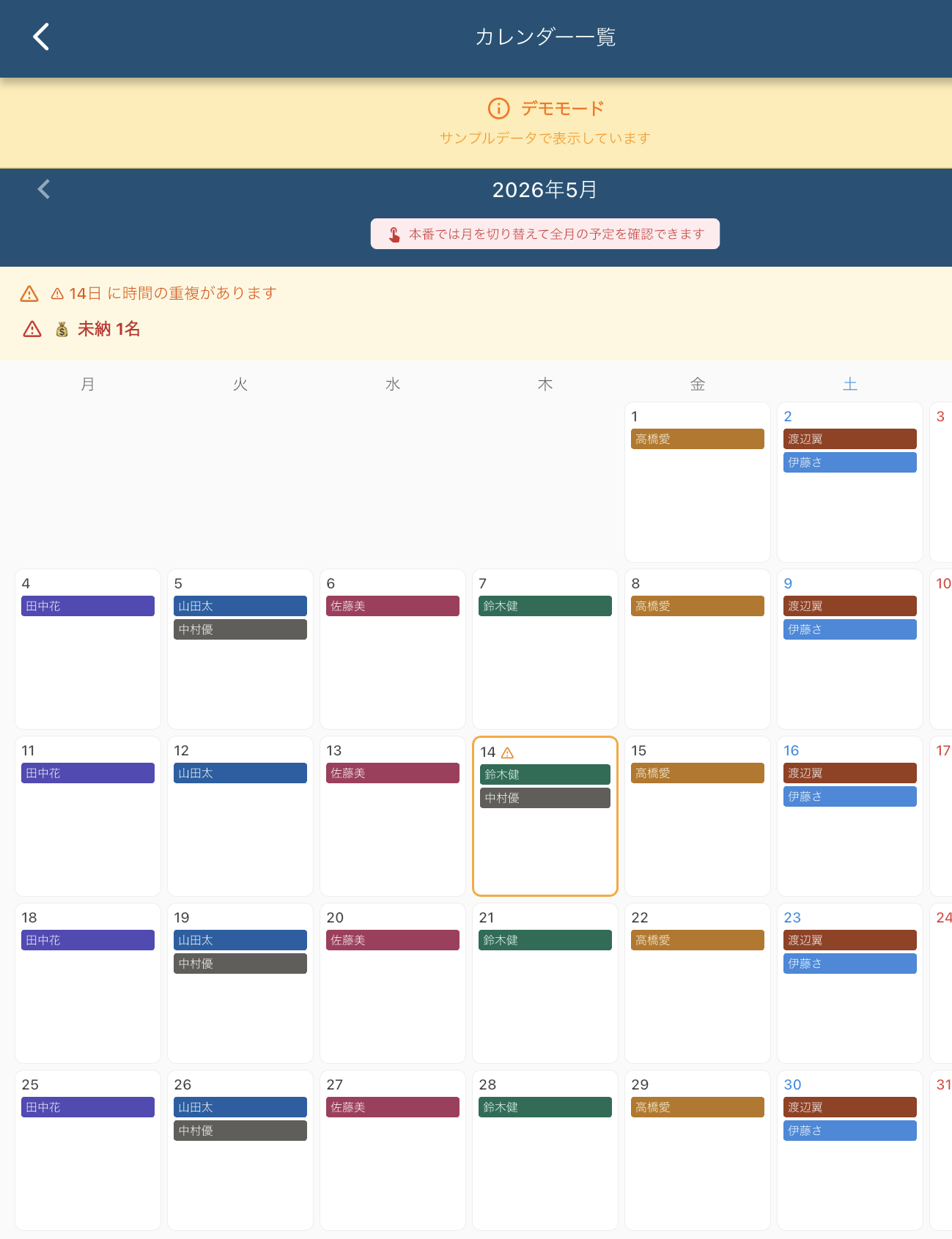
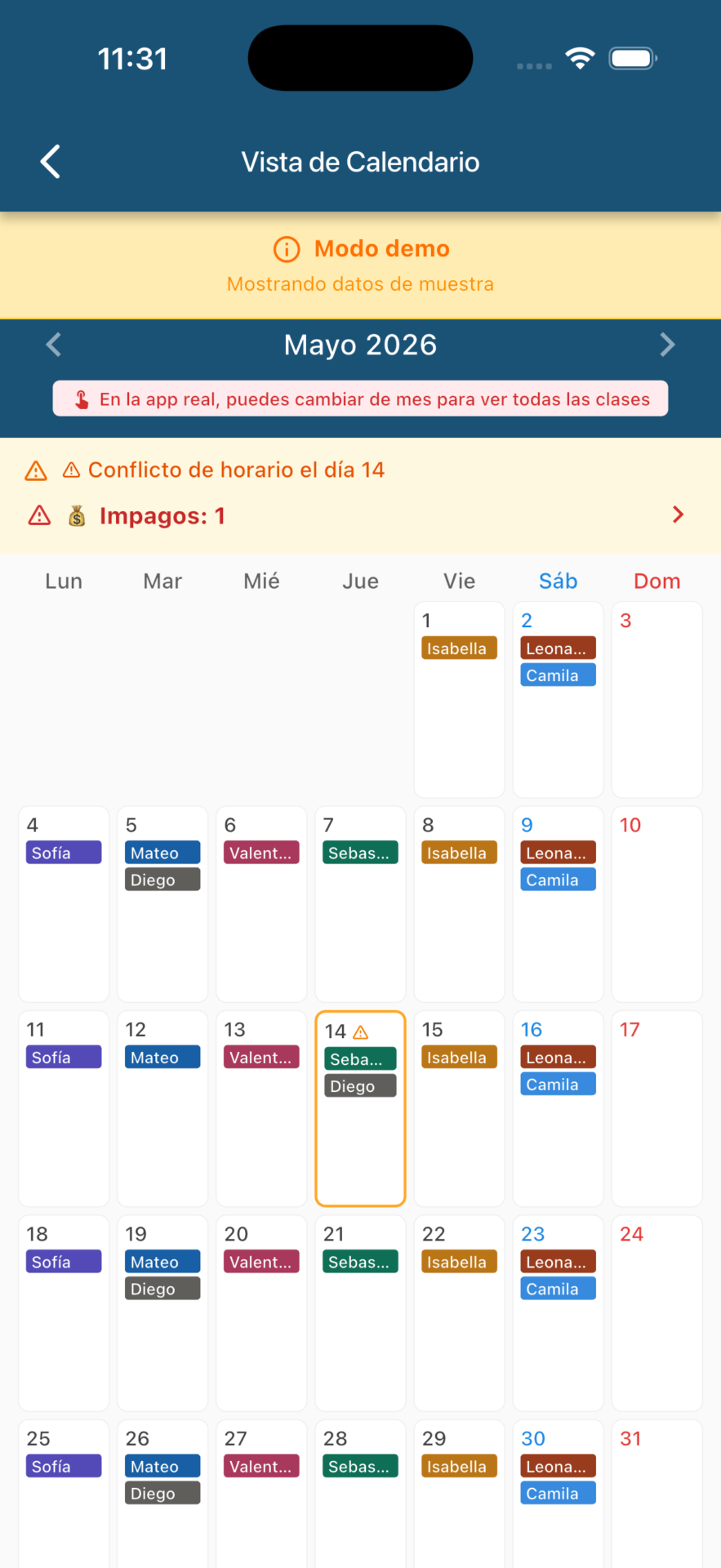
Vista de calendario
Las funciones básicas se pueden usar totalmente gratis. Para los profesores que necesitan más funciones prácticas, las siguientes funciones premium se ofrecen por $17.99 (compra única) o suscripción mensual ($1.99).
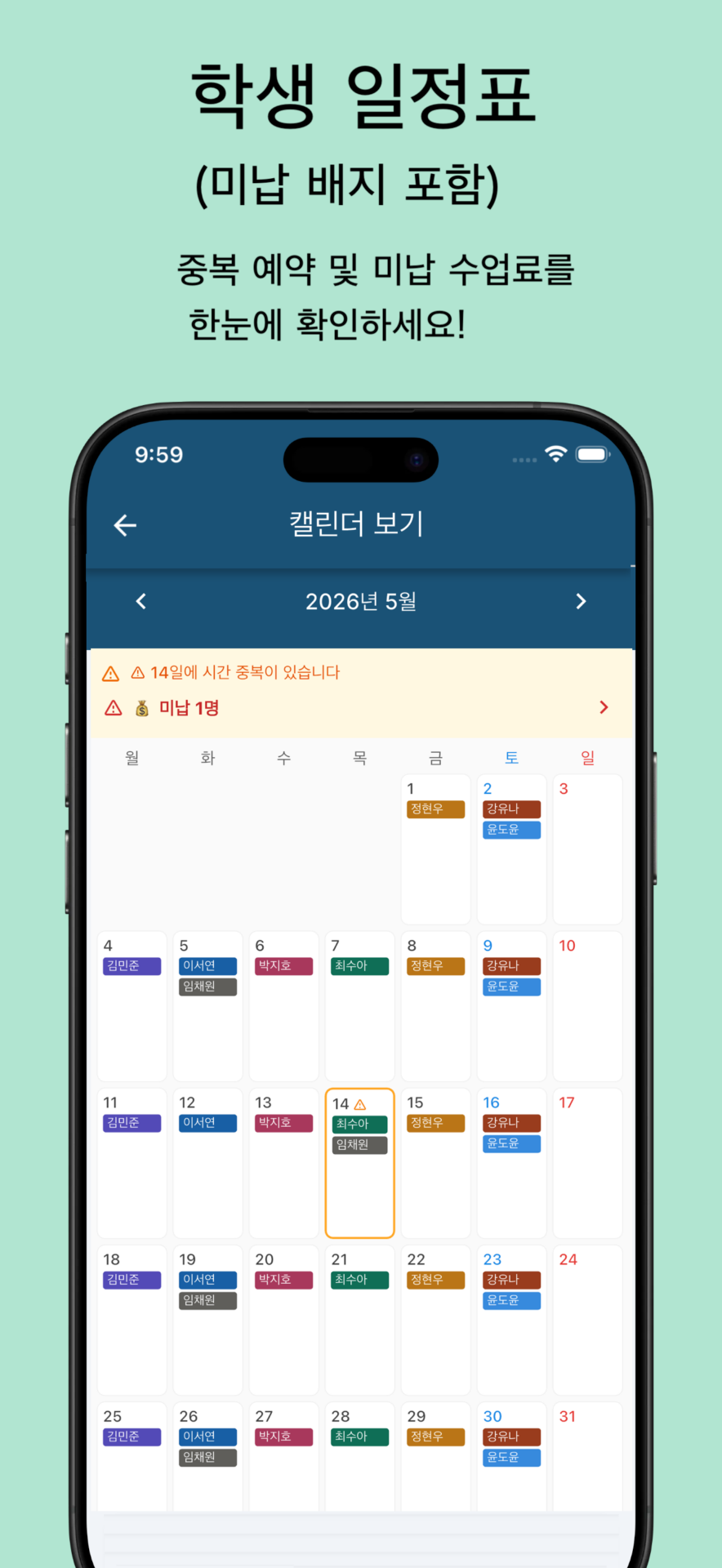
Puedes consultar las clases de todos los alumnos por mes
Al tocar una fecha, puedes ver el detalle de las clases de ese día
Detecta automáticamente reservas duplicadas y avisa
También puedes ver de un vistazo a los alumnos con impago
También puedes confirmar el estado de pago de las cuotas
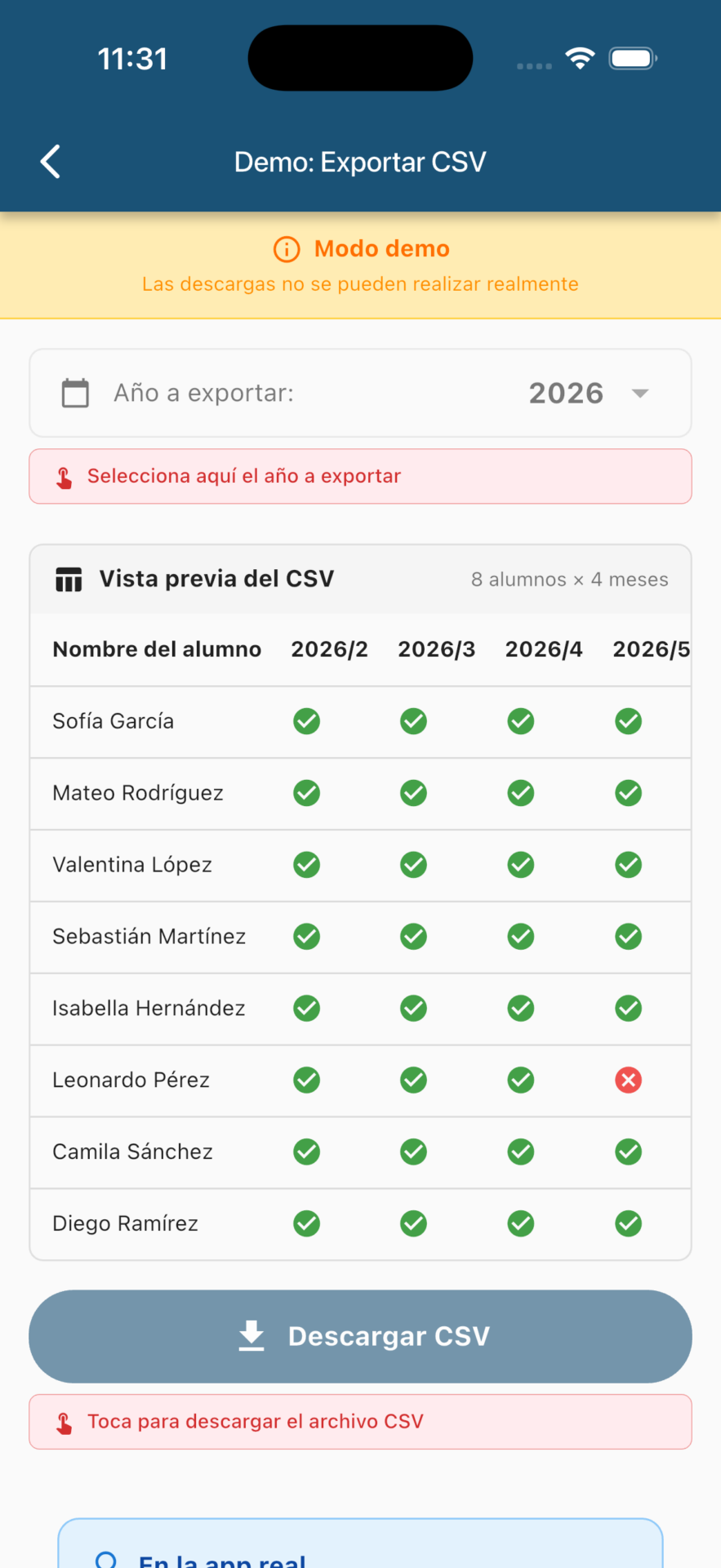
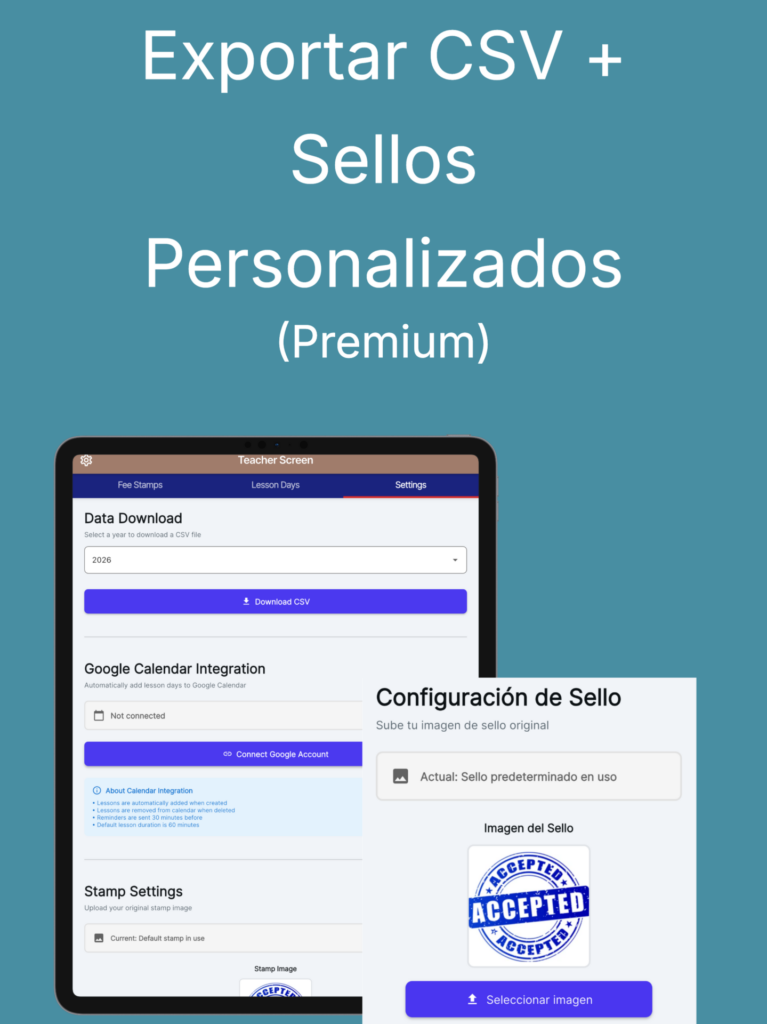
Descarga CSV
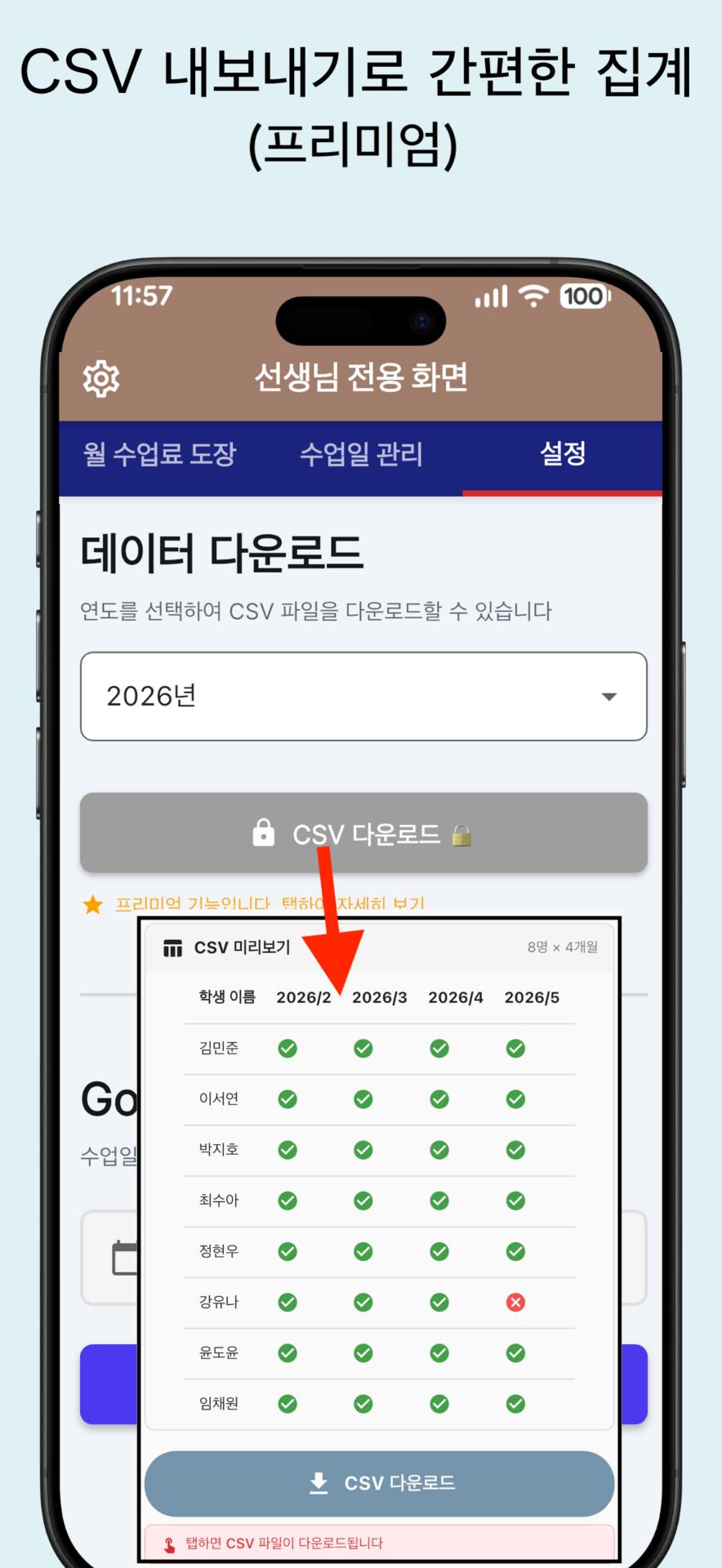
Puedes exportar el registro de cuotas a CSV por año.
Descarga CSV: descarga todo el historial de sellos en formato CSV.
Puedes hacer recuentos・análisis en Excel o Google Sheets.
Es práctico para la declaración de impuestos o el cierre anual.
También es sencillo importarlo a un software de contabilidad
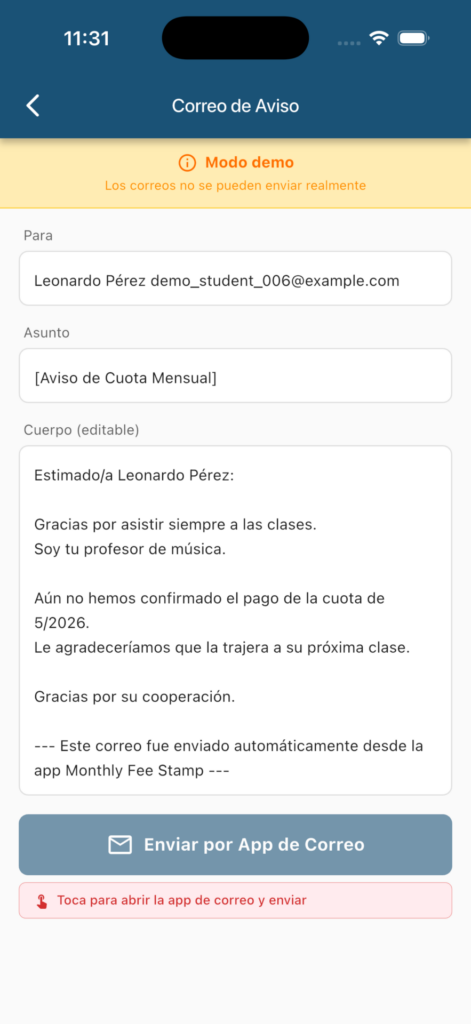
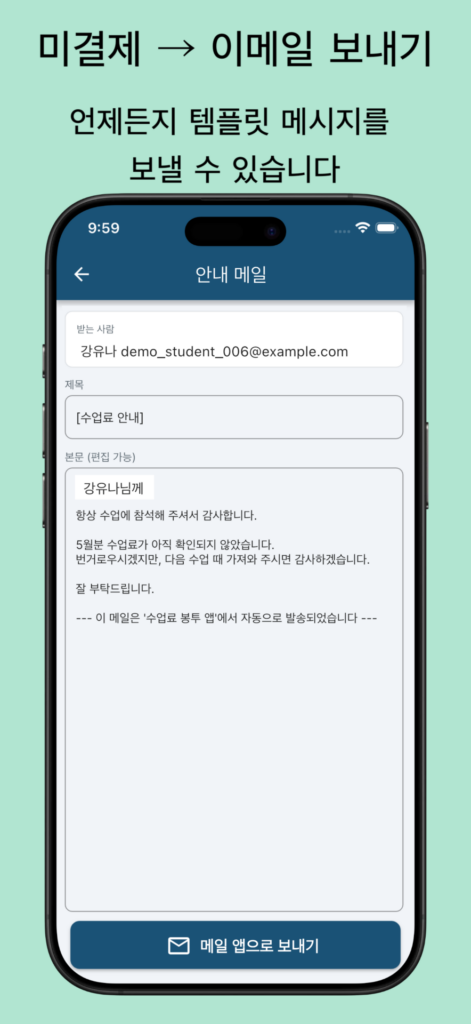
Correo para alumnos con cuota impaga
Detecta automáticamente a los alumnos con cuota impaga
Crea el correo de aviso de una vez
El cuerpo del correo se genera automáticamente con una plantilla
La app inserta automáticamente el nombre del alumno y el mes
El cuerpo se puede editar libremente antes de enviarlo
💰 El cuidado de la función de gestión de impagos Hemos reflejado en la función el sentir real de「al profesor le cuesta hablar de la cuota」.
La frase que se añade automáticamente al final del correo:
— Este correo fue enviado automáticamente desde la app Monthly Fee Stamp —
Precisamente porque se sabe que es un texto estándar, el alumno no se siente herido y al profesor le resulta más fácil sacar el tema. Esta línea es el núcleo de esta función.
Sello original
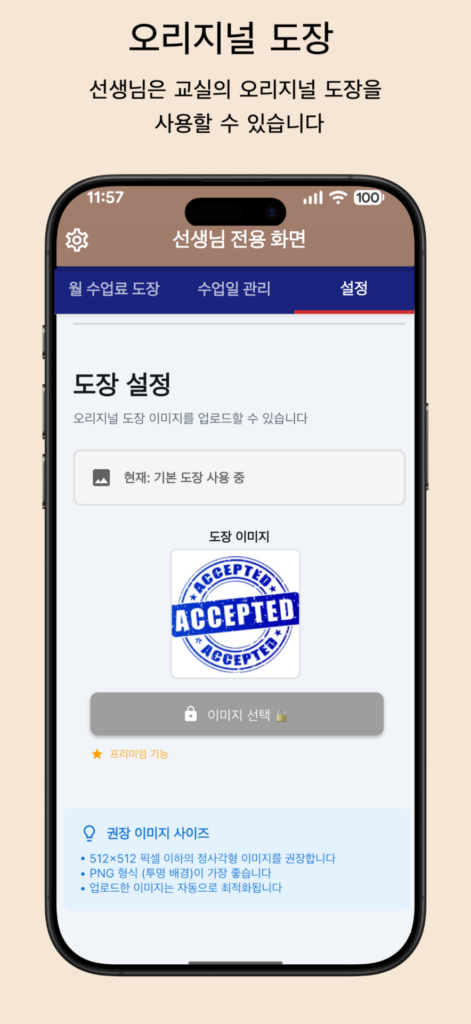
Sello original: puedes configurar una imagen de sello propia de tu academia.
Usando el logo o una ilustración de tu academia, puedes crear un sobre de cuotas más personal.
Eficaz para la gestión de marca
Aumenta la satisfacción de los alumnos
※Las funciones premium son solo para el profesor; alumnos y tutores pueden seguir usándola gratis.
■ Cómo usarla (profesor)
Registra una cuenta → emite el ID de aula
Comparte el ID de aula con los alumnos (o sus tutores)
Tras unirse el alumno, cada vez que cobres solo「pon el sello」
Filtra por año/mes/alumno para revisar los impagos
Según necesites, mejora aún más el recuento・gestión con las funciones premium
【Cómo iniciar la integración con Google Calendar】
En la pantalla de ajustes, toca「Conectar cuenta de Google」
Concede los permisos
¡Al añadir una clase se registra automáticamente en el calendario!
■ Cómo usarla (alumno/tutor)
Registra una cuenta → introduce el ID de aula que te dio el profesor
Consulta tu propio sobre de cuotas en la app
Conoce la situación mediante la fecha de cobro y la nota del sello
Al tocar el mensaje corto bajo el sello se amplía
Toca una fecha de clase para ver el detalle
■ ¡Más cómodo que el sobre de cuotas en papel! Útil en estas situaciones
Cuando quieres confirmar el cobro de principios de mes「rápido y de un vistazo」
Cuando quieres gestionar el horario de clases con Google Calendar
Cuando quieres registrar clases periódicas de una vez (2 veces al mes, 3 veces por semana, etc.)
Cuando quieres transmitir con seguridad un coste adicional (cuota de recital o material) sin escribir una nota a mano cada vez
Cuando quieres confirmar el estado del cierre todo junto al final del trimestre
Cuando quieres que los tutores puedan confirmar「pagado/impago」en cualquier momento
Cuando quieres analizar en Excel los datos de recuento de fin de año (función premium)
■ Preguntas frecuentes
¿Qué hago si pongo el sello por error?
Cancelándolo se corrige fácilmente. La fecha y la nota también se gestionan a la vez.
¿Puedo usar el mismo dispositivo para distintas academias?
El profesor gestiona por separado mediante el ID de aula, así que varias academias también son seguras. El alumno se une con el ID de aula indicado.
¿Se conservan los datos al cambiar de dispositivo?
Iniciando sesión con tu cuenta, puedes usar tal cual el historial de sellos anterior.
¿Cuál es el rango de uso gratuito?
Las funciones básicas de gestión de cuotas (crear sello, ver historial, filtrar, etc.) y la gestión de clases y la integración con Google Calendar son totalmente gratis. La vista de calendario, la detección de reservas duplicadas, el control de alumnos con impago, la función de envío de correo, la exportación CSV o el sello original son las opciones de pago.
¿Los alumnos y tutores también tienen que pagar?
No. Las funciones premium son solo para el profesor; alumnos y tutores pueden usarla totalmente gratis.
¿En qué academias se puede usar?
Guitarra, piano, yoga, danza, conversación en inglés, caligrafía, ábaco, etc., se puede usar en todo tipo de academias de gestión individual.
■ Sobre la seguridad
Todos los datos se gestionan de forma segura mediante Firebase
El acceso a Google Calendar se mantiene al mínimo necesario
Diseño en el que los datos se separan por ID de aula y no se mezcla la información de otras academias
No proporcionamos información personal a terceros
Política de privacidad: https://sinqwell.net/privacy-policy/
Términos de servicio: https://sinqwell.net/terms-of-service/
■Dispositivos compatibles
・iPhone (iOS 13.0 o superior) ・iPad ・Android (Android 5.0 o superior)
■ Filosofía de desarrollo
El「sobre de cuotas en papel」es un método querido desde hace mucho tiempo. Conservando sus「ventajas」, reduce la inquietud por pérdidas y la molestia del recuento, digitalizándolo de una forma amigable tanto para profesores como para alumnos. La forma de usarlo no cambia, solo se aligera la molestia ― eso es「Monthly Fee Stamp」. Un poco más cómodo que el sobre de cuotas en papel. Desde hoy, haz que cobrar y confirmar sea más sencillo.
🎉 ¡Pruébala gratis ahora mismo!
Haz que la gestión de cuotas y horarios de clases sea más eficiente, y la gestión de tu academia más fluida. Prueba primero las funciones gratuitas.
수업료 봉투 앱 「수업료 봉투 앱」으로 교실 운영을 더 효율적으로!종이 수업료 봉투의 장점은 그대로 살리면서, 개인 운영 교실의 선생님을 위해 만든 수업료 관리 및 수업 일정 관리 앱입니다. 기타, 피아노, 요가, 수영, 체조, 댄스, 음악, 영어 회화, 그림, 서예, 다도, 꽃꽂이 교실 등, 다양한 교실에서 사용할 수 있습니다. 개발 환경:FlutterFlow→Flutter 무료(광고 없음)(선생님만 고급 기능 이용 가능)
「수업료 봉투 앱」은 「종이 수업료 봉투」를 그대로 휴대폰으로 옮긴 간단한 출석・수금 보조 앱입니다. 선생님은 수업료를 받으면 「도장 찍기」만 하면 됩니다. 도장에는 「발표회비 포함」「교재비 포함」 등의 메모를 추가할 수 있고, 수금 날짜는 자동으로 기록됩니다. 실수로 잘못 찍어도 한 번에 취소할 수 있습니다. 학생(보호자)은 앱에서 종이 수업료 봉투와 같은 느낌으로 언제든지 납부 상황을 확인할 수 있습니다. 종이보다 명확하고, 분실되지 않으며, 찾을 필요도 없습니다. 그 「익숙한 수업료 봉투」 경험을 그대로 휴대폰으로 옮겼습니다.
선생님은 도장이 찍힌 메시지로 수업료를 확인하고, 학생은 앱에서 수업료 봉투 그대로의 모습으로 납부 상황을 확인합니다! 수업 날짜도 공유할 수 있는 편리한 앱입니다.
🎉 Google 캘린더 완전 연동! 수업 일정을 자동으로 등록하고, 정기 수업도 한 번에 등록할 수 있습니다. 주 2회 수업 등, 둘째 주・넷째 주를 지정할 수 있습니다. 30/45/60/90분 수업 시간도 선택할 수 있습니다. 교실 운영이 더욱 편리해집니다!
「수업료 봉투 앱」이란
개인 운영 교실의 선생님을 위해 만든 수업료 관리 및 수업 일정 관리 앱입니다. 기타, 피아노, 요가, 댄스 등, 다양한 교실에서 사용할 수 있습니다. 「종이 수업료 봉투」의 장점은 그대로 살리면서, 분실의 불안과 집계의 번거로움을 줄여, 선생님과 학생 모두에게 친화적인 형태로 디지털화했습니다. Google 캘린더 연동을 통해, 수업 일정 관리도 자동화할 수 있습니다.
■ 수업료 관리가 편해지는 이유
쓸 필요도・찾을 필요도 없음 수금 날짜가 자동으로 기록되고, 메모도 한 번에 입력됩니다. 더 이상 종이를 뒤져서 실적을 확인할 필요가 없습니다.
「미납」을 놓치지 않음 연/월/학생별로 필터링하여, 누가 미납인지 순식간에 파악할 수 있습니다. 알림의 정확도가 올라갑니다.
교실 운영에 최적 데이터를 교실 ID로 구분하여, 기타 교실・피아노 교실・주산 교실 등 여러 교실도 안심하고 사용할 수 있습니다.
종이보다 편리하고 안전 데이터가 클라우드에 저장됩니다. 기기를 변경해도 계정으로 로그인하면 바로 이어서 사용할 수 있습니다.
■ 선생님 전용 주요 기능
【수업료 도장 관리】
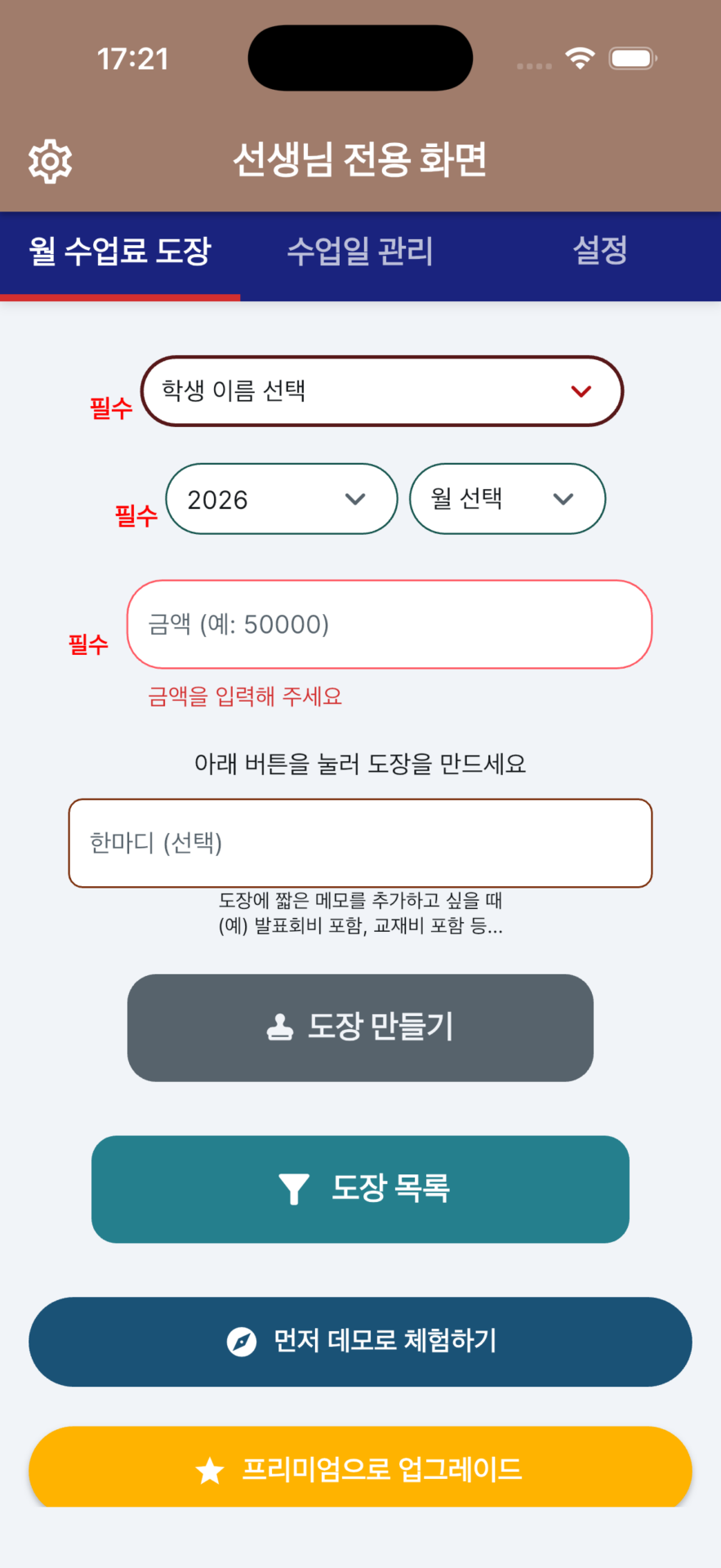
도장 등록:수업료를 받으면 학생을 선택하여 도장을 찍습니다. 수금 날짜가 자동으로 입력되고, 메모도 함께 기록할 수 있습니다.
간단한 취소:잘못 찍거나 금액 수정 시, 도장을 취소하면 바로 초기화됩니다.
이력 시각화:도장 작업 이력이 자동으로 저장됩니다. 누가、언제、어떤 메모로 수금했는지 한눈에 알 수 있습니다.
강력한 필터:연/월/학생별로 필터링할 수 있습니다. 미납 학생을 바로 찾아내어, 독촉 누락을 방지합니다.
【수업 일정 관리】
학생별 수업일 등록
단일 수업 추가
정기 수업 한 번에 등록
수업 시간 사용자 지정(30/45/60/90분)
주차 선택 기능(1〜5주차, 또는 매주)
수업 횟수 자동 계산
【Google 캘린더 완전 연동】(앱 조작→Google 캘린더 동기화)
(*Google 캘린더→앱 동기화는 없습니다. 앱 측에서 조작하는 단방향 동기화입니다.)
수업 추가 시 자동으로 캘린더에 등록
수업 삭제 시 자동으로 캘린더에서 제거
기존 수업 한 번에 동기화
30분 전 자동 알림
학생 이름과 시간 자동 표시
【정기 수업의 편리한 기능】
여러 요일 동시 선택(예:월・수・금)
주차 지정(예:둘째 주와 넷째 주만=매월 2회)
지정 기간 한 번에 등록
생성될 수업 수 실시간 표시
【교실 관리】
교실 ID 발급:선생님이 교실 ID 하나를 발급하고, 학생은 그 ID로 교실에 참여합니다. 각 반 관리가 원활합니다.
교실별 분리:교실 ID로 데이터를 분리하여 관리합니다. 여러 교실도 섞이지 않아 안심하고 사용할 수 있습니다.不會混淆,安心使用。
■ 학생・보호자 전용 주요 기능
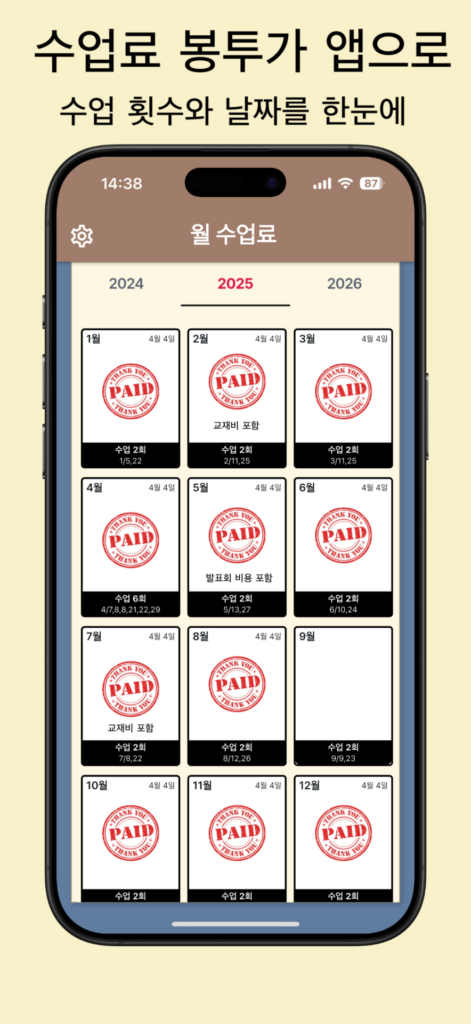
「종이 그대로」의 안심감:매월의 수금 도장과 날짜가 나란히 표시되어, 종이 수업료 봉투와 똑같이 명확하고 읽기 쉽습니다.
언제든지 확인:휴대폰만 있으면 외출 중에도 납부 상황을 확인할 수 있습니다. 봉투 분실・잃어버림의 걱정이 줄어듭니다.
편리한 연락:도장 메모(발표회비 포함 등)를 통해, 추가 비용이 있는지 바로 알 수 있습니다.
매월 수업일을 확인할 수 있습니다.
(이번 달에 몇 번 수업했는지?탭하면 더 확대 표시되어, 시간까지 자세히 확인할 수 있습니다.)
■ 고급 기능(영구 구매 $17.99)
캘린더 한눈에 보기
기본 기능은 완전히 무료로 사용할 수 있습니다. 더 많은 편리한 기능이 필요한 선생님을 위해, 다음 고급 기능을 $17.99(영구 구매) 또는 월정액($1.99)으로 제공합니다.
모든 학생의 수업을 월 단위로 확인할 수 있습니다
날짜를 탭하면, 그날의 수업 상세를 볼 수 있습니다
중복 예약을 자동으로 감지하여 경고합니다
미납 학생도 한눈에 파악할 수 있습니다
수업료 납부 상황도 확인할 수 있습니다
CSV 다운로드
연도별로 수업료 기록을 CSV로 내보낼 수 있습니다.
CSV 다운로드:모든 도장 이력을 CSV 형식으로 다운로드합니다.
Excel이나 Google 스프레드시트에서 집계・분석할 수 있습니다.
세금 신고나 연말 결산 시 편리합니다.
회계 소프트웨어로 가져오기도 간단합니다
수업료 미납 학생에게 보내는 메일
수업료가 미납인 학생을 자동으로 감지
한 번에 알림 메일 작성
메일 본문이 템플릿으로 자동 생성
앱이 학생 이름과 월을 자동으로 삽입
본문은 보내기 전에 자유롭게 편집 가능
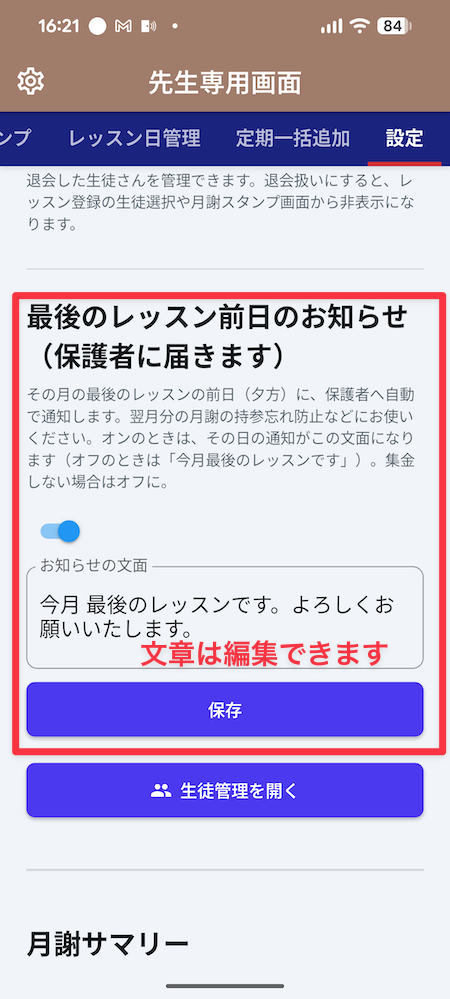
💰 미납 관리 기능의 배려 「선생님이 수업료를 말하기 어려운」 현장의 마음을 기능에 반영했습니다.
메일 마지막에 자동으로 추가되는 한 문장:
— 이 메일은 ‘수업료 봉투 앱’에서 자동으로 발송되었습니다 —
정형 문구임을 알기에, 학생도 상처받지 않고, 선생님도 말을 꺼내기 쉽습니다. 이 한 줄이 이 기능의 핵심입니다.
오리지널 도장
오리지널 도장:교실 고유의 도장 이미지를 설정할 수 있습니다.
교실의 로고나 일러스트를 사용하여, 더 개성 있는 수업료 봉투를 만들 수 있습니다.
브랜드 운영에 효과적
학생의 만족도 향상
※고급 기능은 선생님 측만, 학생・보호자는 무료로 계속 사용할 수 있습니다.
■ 사용 방법(선생님)
계정 등록 → 교실 ID 발급
교실 ID를 학생(보호자)에게 공유
학생이 참여한 후, 수금할 때마다 「도장 찍기」만
연/월/학생별로 필터링하여 미납 확인
필요에 따라 고급 기능으로 집계・관리를 더욱 효율화
【Google 캘린더 연동 시작 방법】
설정 화면에서 「Google 계정 연결」을 탭
권한 허용
수업 추가 시 자동으로 캘린더에 등록!至日曆!
■ 사용 방법(학생/보호자)
계정 등록 → 선생님이 제공한 교실 ID 입력
앱에서 자신의 수업료 봉투 확인
도장의 수금일과 메모로 상황 파악
도장 아래의 짧은 메시지를 탭하면 확대 표시
수업일을 탭하여 상세 확인
■ 종이 수업료 봉투보다 편리! 이런 상황에서 활용
「한눈에 빠르게」 월초의 수금 확인을 하고 싶을 때
Google 캘린더로 수업 일정을 관리하고 싶을 때
정기 수업을 한 번에 등록하고 싶을 때(매월 2회, 매주 3회 등)
추가 비용(발표회비나 교재비)을 확실히 전달하고 싶을 때, 매번 손으로 메모하지 않아도 됨
학기 말에 결산 상황을 한꺼번에 확인하고 싶을 때
보호자가 언제든지 「납부/미납」을 확인할 수 있게 하고 싶을 때
연말의 집계 데이터를 Excel로 분석하고 싶을 때(고급 기능)
■ 자주 묻는 질문
도장을 잘못 찍었을 때는 어떻게 하나요?
취소하면 간단히 수정할 수 있습니다. 날짜와 메모도 함께 관리할 수 있습니다.
같은 기기를 다른 교실에서 사용할 수 있나요?
선생님은 교실 ID로 별도 관리하므로 여러 교실도 안심입니다. 학생은 지정된 교실 ID로 참여합니다.
기기를 변경해도 데이터가 남아 있나요?
계정으로 로그인하면, 과거의 도장 이력을 그대로 사용할 수 있습니다.
무료로 사용할 수 있는 범위는?
기본적인 수업료 관리 기능(도장 작성, 이력 확인, 필터링 등)과 수업 관리, Google 캘린더 연동은 완전히 무료입니다. 캘린더 한눈에 보기, 중복 예약 감지, 미납 학생 파악, 메일 발송 기능, CSV 내보내기나 오리지널 도장 등의 부가 기능이 유료 옵션입니다.
학생・보호자도 비용을 지불해야 하나요?
아니요. 고급 기능은 선생님 측만, 학생・보호자는 완전히 무료로 사용할 수 있습니다.
어떤 교실에서 사용할 수 있나요?
기타, 피아노, 요가, 댄스, 영어 회화, 서예, 주산 등, 개인 운영의 다양한 교실에서 사용할 수 있습니다.
「종이 수업료 봉투」는 오랫동안 사랑받아 온 방식입니다. 그 「장점」은 그대로 살리면서, 분실의 불안과 집계의 번거로움을 줄여, 선생님과 학생 모두에게 친화적인 형태로 디지털화했습니다. 사용 방법은 그대로, 번거로움만 덜어주는 ― 그것이 「수업료 봉투 앱」입니다. 종이 수업료 봉투보다, 조금 더 편리하게. 오늘부터 수금과 확인을 더 간단하게.
🎉 지금 바로 무료로 사용해 보세요!
수업료 관리와 수업 일정 관리를 더 효율적으로, 교실 운영을 더 원활하게. 먼저 무료 기능을 사용해 보세요.